Join GitHub today
GitHub is home to over 40 million developers working together to host and review code, manage projects, and build software together.
Sign upPrefer 64-bit CPython for Windows downloads #1299
Comments

This comment has been minimized.
This comment has been minimized.

|
See also related Python-dev thread: https://mail.python.org/pipermail/python-dev/2018-July/154541.html |

This comment has been minimized.
This comment has been minimized.

|
My opinions: if we can reliably detect that the user is on 64-bit Windows, offer the 64-bit installer. If we can't do that reliably, offer links to both. If we can make a good guess, perhaps emphasize the one matching the platform we detected. I definitely do not want to suddenly switch from unconditionally offering 32 to unconditionally offering 64. |

This comment has been minimized.
This comment has been minimized.

|
I agree with @zware. The least-complex solution would be to just have two links, which I think is sufficient (and still a major improvement over just having the 32-bit installer). Being able to emphasise the "correct" one would be a bonus. |

This comment has been minimized.
This comment has been minimized.

|
This is basically a duplicate of #171. See #1044 (comment) for my comment about using user agents to detect that the user is on 32-bit or 64-bit Windows. |

This comment has been minimized.
This comment has been minimized.

|
I agree that just having both links is probably easiest and is sufficient. I'd slightly prefer the 64-bit link to be less obvious (e.g. link text rather than a button), as the 32-bit version is going to work 100% of the time rather than 95% of the time, but I'm not hugely concerned. |

This comment has been minimized.
This comment has been minimized.

|
Well, time has passed, and the discussion has continued in many places and here we still are. So let me take this place to list some points coming out of dealing with a not-empty stream of grumps sent to the webmaster email, several quite recently. These comments aren't anything new I imagine.
Collectively we can improve this somehow, right? |

This comment has been minimized.
This comment has been minimized.

|
We also ran into 32-Bit being the implicit (big download button) default on the Windows download page. People are complaining that the mavsdk module cannot be installed on the "default" 32-Bit python version mavlink/MAVSDK-Python#88. We don't currently support 32-Bit with new projects in 2019, we consider it deprecated. Could the Website offer two big buttons one clearly labeled 32-Bit and one 64-Bit? That would not make anything the first click default if there are ongoing discussions about the which one should be. |

This comment has been minimized.
This comment has been minimized.

|
I think the problem here is "32 bit is the default without saying so" |
This comment has been minimized.
This comment has been minimized.
|
@zooba this topic rattles on and on, sorry... anything to add to this particular issue? |
This comment has been minimized.
This comment has been minimized.
|
It seems we have some consensus on just offering both links (perhaps with 64-bit slightly de-emphasized, but both clearly labeled); we just need someone to submit a PR. I have no idea how complex it's likely to be. Agreed with @berkerpeksag that this is really a duplicate of #171. |

This comment has been minimized.
This comment has been minimized.

|
It's worth pointing out that Python 2 is finally being EOL'ed in January and yet Python 3 came out 2 years after Vista which was the start of Microsoft's default to x64 OS (though technically even earlier releases of windows had x64 support). Given that, I'd argue that this is not a duplicate of #171 as I'd very much support the decision to move to 64-bit by default with the optional 32-bit install as an available option for the minority of users who need it. For what it's worth, I checked out a number of apps that might be installed adjacent on someone's windows computer that installs Python. I considered: VSCode, Notepad++, Sublime Text, the go installer, java, vlc, chrome, and firefox. Several default to x64, but show both links. Some include 64bit by default and make 32-bit harder to find or not at all. Among those that default to 32-bit, only VLC doesn't explicitly state it was 32-bit and include an immediately visible 64-bit link (though it is available via a drop-down, so still an improvement over python.org). I'll take a look at a potential PR based on @zware's comment above. |

This comment has been minimized.
This comment has been minimized.

|
The installer linked to in the supernav for a given OS is determined by a "download_button" boolean field on the ReleaseFile model. There is no "secondary download" boolean field (and imo it doesn't make sense to have one), so there's only one download option that can be displayed. I'm not familiar with the method used for pushing new releases, but it seems like it'll just be ticking a different box on the latest release. The other option is to add "32-bit" and "64-bit" boolean fields to ReleaseFile, and set download_button on the applicable 32-bit and 64-bit instances. I might make a PR for the latter, unless someone has a better idea. |


Is your feature request related to a problem? Please describe.
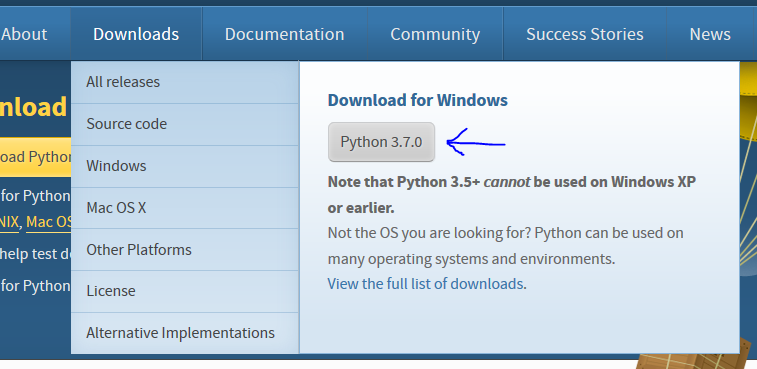
The download links for CPython for Windows (When browsing from Windows) link to the 32-bit version of Python. Considering that the Python launcher for Windows already prefers the 64-bit version (3.4.4.2. Customizing default Python versions), I would assume that the 64-bit version is preferred (I think 32-bit Windows is a rarity nowadays). Wouldn't it make sense to change it to the 64-bit version if the user is browsing from a 64-bit Windows?
The core developers for CPython on Windows should probably voice their opinion on this.
Describe the solution you'd like
The download links point to the 64-bit Python version.
Describe alternatives you've considered
It's also possible to link to both versions and let the user decide, with a link explaining the differences.
Additional context
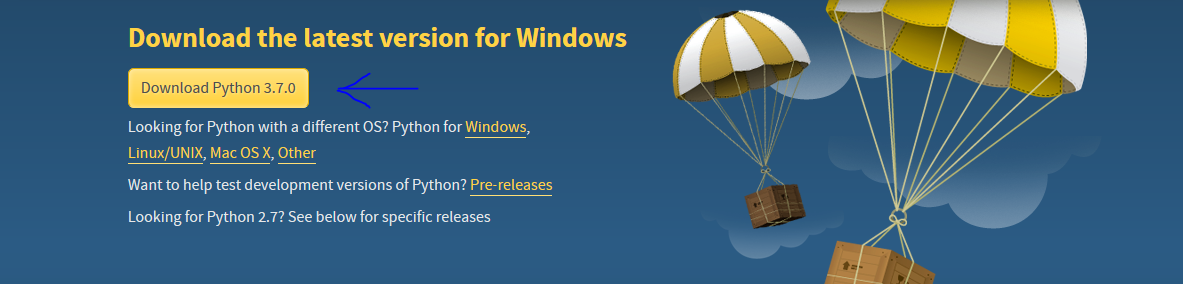
For example, this link:
And there is another one on the download button hover in the top bar.