iCloud Photos keeps everything up to date
iCloud Photos works seamlessly with the Photos app to keep your photos and videos securely stored in iCloud and up to date on your iPhone, iPad, iPod touch, Mac, Apple TV, and iCloud.com. For example, let's say you have an iPhone, iPad, and Mac. You can snap a photo of your niece on your iPhone and — if you enable iCloud Photos on all of your devices — you'll see that same photo in the Photos app on your iPad and Mac too.
If you're on a Mac or PC, you can use iCloud.com to access your photos and videos.

Check to see if you have iCloud Photos turned on
Not sure if you have iCloud Photos set up on your iPhone, iPad, or iPod touch? Here's how to verify:
- Go to Settings > [your name] > iCloud.
- Tap Photos.
- If you need to, tap to turn on iCloud Photos.
If you can't turn on iCloud Photos, you might need to make changes to your storage plan.


How to access iCloud Photos
- Open the Photos app.
- Tap the Photos tab
 to see your photos.
 - Tap the Albums tab
 to see My Albums, Shared Albums, People & Places, Media Types, and Other Albums. You can also learn more about content that you share with others.
Check your iCloud storage
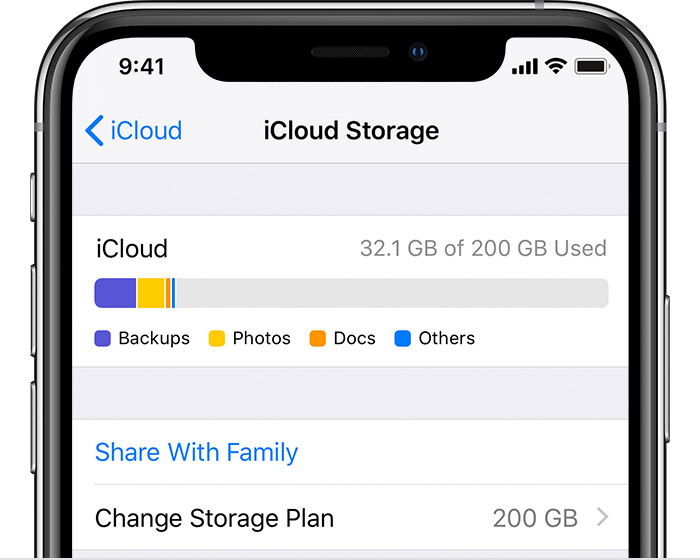
You can easily check your iCloud Photos storage:
- On your iPhone, iPad, or iPod touch, go to Settings > [your name].
- Tap iCloud > Manage Storage.
- Tap Change Storage Plan to make changes.
You can also see how iCloud Photos uses your iCloud storage.
Do more with your photos
•Find out how to transfer photos and videos from your iPhone, iPad, or iPod touch.
•Learn how to download photos and videos from iCloud.