Announcing GitHub Desktop 1.4
- Sep 12, 2018
-
nerdneha
Get warned about merge conflicts before you merge
In the past few releases, we’ve been working on ways to simplify collaboration in GitHub Desktop. In 1.2, we introduced the ability to compare one branch to another and merge, then 1.3 came along and we added a handy notification for new changes in your master branch, including the ability to easily bring these changes into your branch. In this 1.4 release, GitHub Desktop provides information about whether or not you’re going to encounter conflicts before merging.
We’ve heard from lots of people that merge conflicts are a particularly frustrating part of collaboration, and it’s helpful to know what you will encounter prior to attempting to merge. This release allows you to make an informed decision about merging with fewer surprises. Will the merge take a single click and be done? Now you’ll know ahead of time:
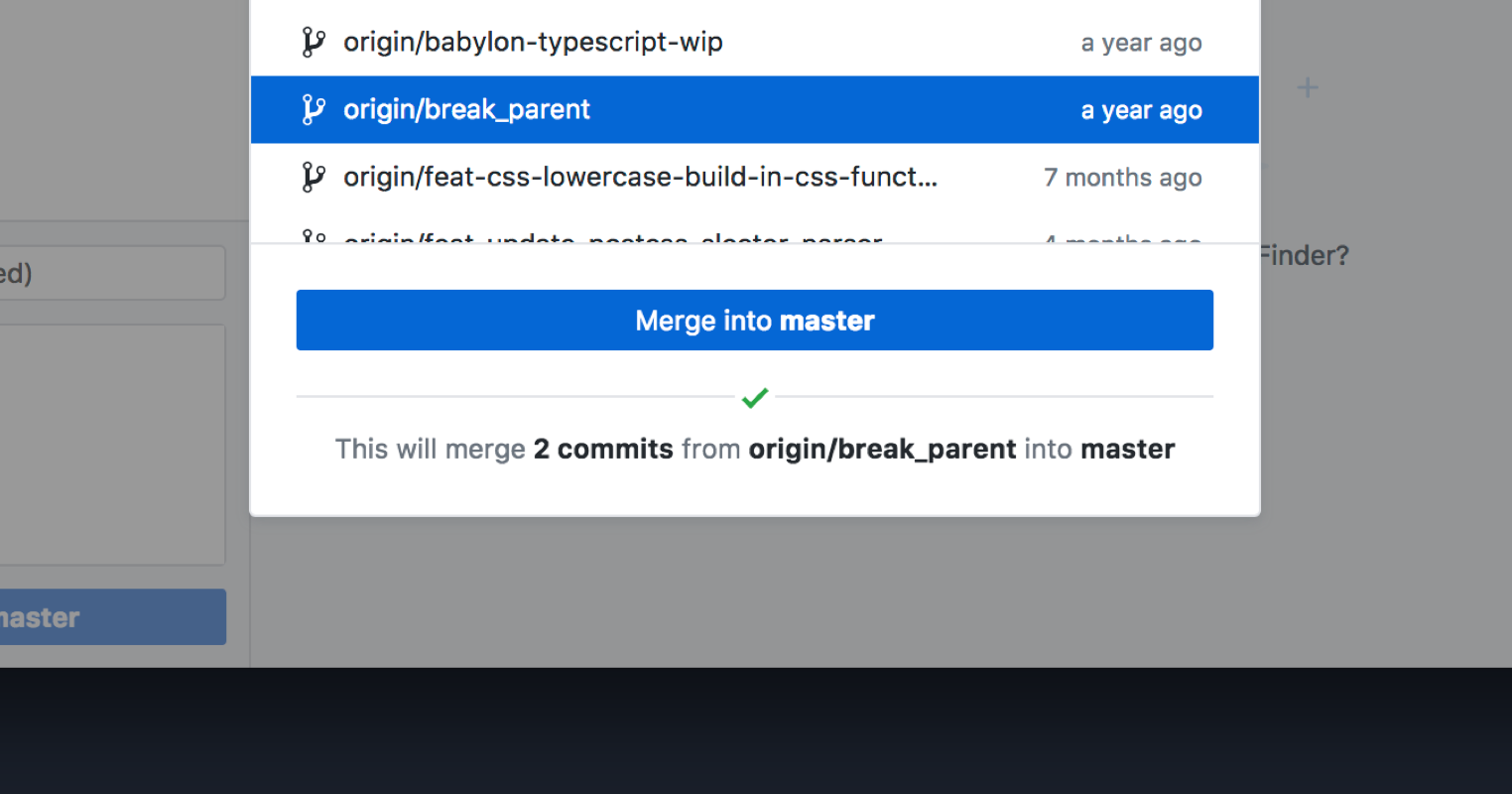
Will the merge result in a conflict? GitHub Desktop will let you know, along with a sense of how much effort the conflicts might take to resolve:
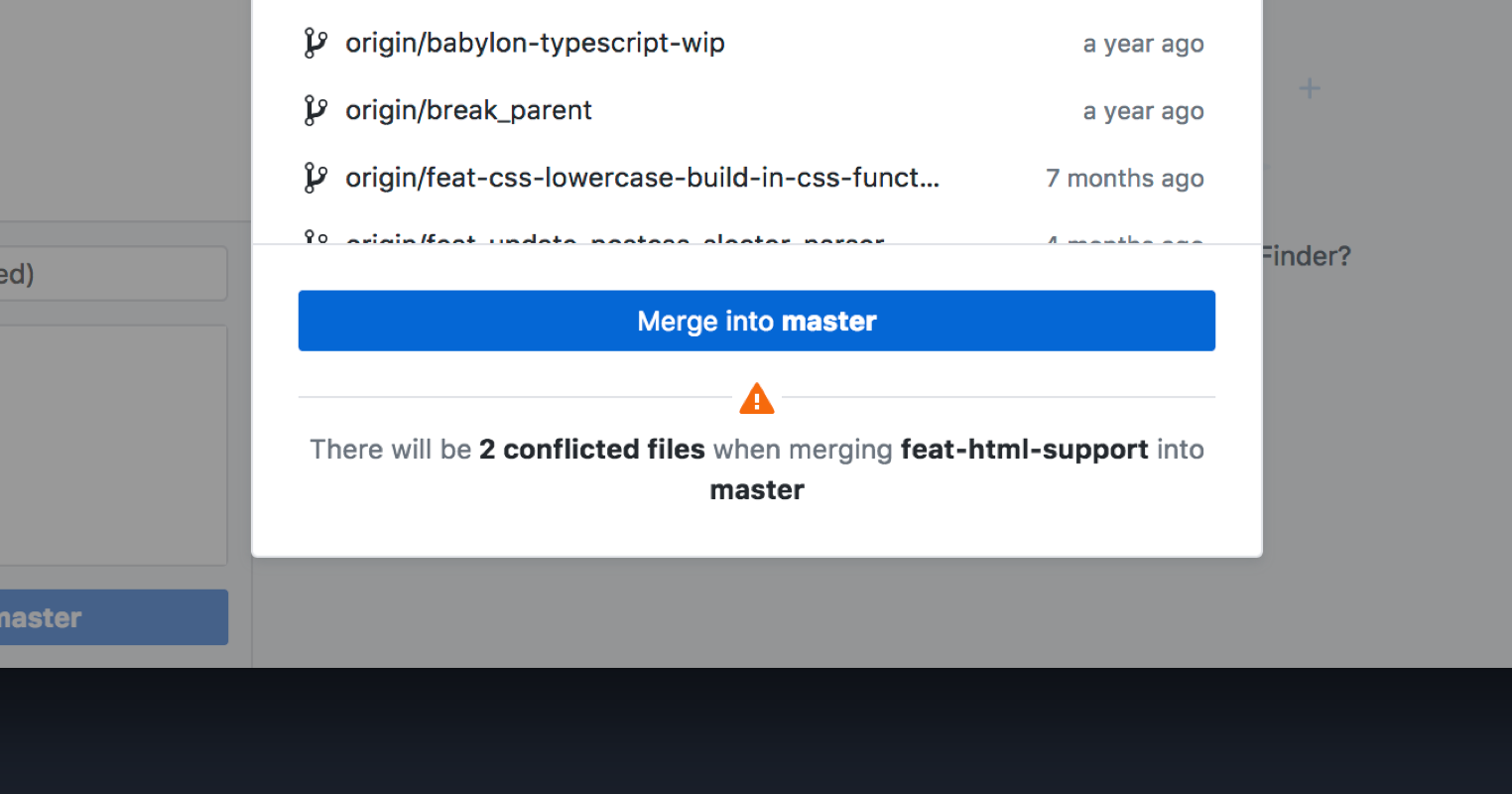
We’ve heard your feedback, and we thought adding details about merge conflicts would be a great addition to GitHub Desktop. With our upcoming releases, we’ll add more functionality to help you and your team make sound decisions when you encounter a merge conflict. Using GitHub Desktop, you can collaborate with your team more easily—with less overhead.
Preview what’s new in the app
We’re also releasing our first step towards showcasing what’s possible when using GitHub Desktop. In 1.4, we’ve added our release notes to the app to highlight what’s changed since the last release, and to recognize—and thank—our amazing contributors.
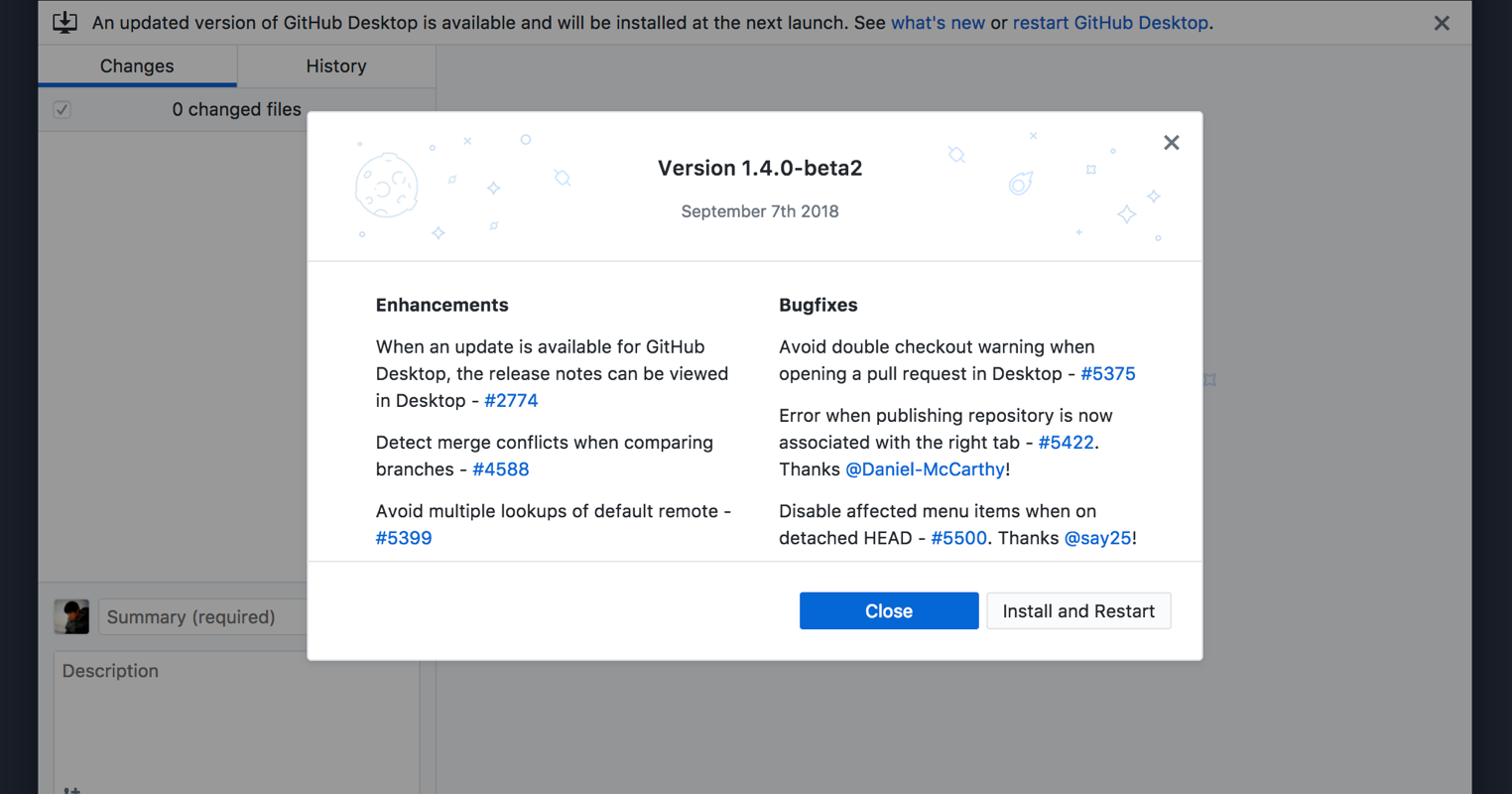
We’re looking forward to continuing to make GitHub Desktop a valuable and intuitive tool for collaboration (and more!), so stay tuned for even more enhancements.
Diversity, inclusion, and belonging at GitHub in 2018
- Sep 12, 2018
-
merrittqa
In 2016, we released our first annual Diversity Report. At the time, we were transparent about our journey and our goals for the future. We made a commitment to improve—and today, we’re sharing an update on our progress and our plans for the road ahead.
If there’s one thing we’ve learned over the past few years, it’s that each Diversity Report is just a snapshot of our journey. This year, we’ve taken our report to the next level—we’ve expanded the scope of the data and the lens through which we look at diversity, inclusion, and belonging at GitHub. We’ve taken a deeper look into our distributed workforce, analyzed upward mobility across the company, and assessed where our retention strategies have fallen short.
In order to build a product that will be used by future generations of software developers, we must continue to build a company that reflects the world we live in.
Reflecting on the results
We’ve seen heartening improvements within some of the data: an increase in the number of our distributed Hubbers, promotion rates among women and men that are about equal (and, if anything, stronger for women), and an increase in black Hubbers who hold leadership positions.
Despite these encouraging results, we also experienced a 4% decrease in the percentage of women and a 1% decrease in the number of underrepresented minorities working across the organization over the past year. While we can’t definitively pinpoint the root cause of these decreases, we have begun to identify systems and programs that will enable all Hubbers to build their careers at GitHub.
Sharing what we built
When we shared our Diversity Report last year, we also launched a new department—Employee Experience and Engagement (EEE)—with a dedicated focus on diversity, inclusion, and belonging (DI&B). As a result, 2018 was a year focused on optimism, transition, and building at GitHub.
We amplified and strengthened our commitment to this work by:
- Integrating our diversity, inclusion, and belonging strategy into our employee experience programs
- Building out our DI&B team
- Formalizing and expanding communities of belonging among employees along various vectors, including locations, demographic backgrounds, interests, and more
We made headway on our DI&B goals in 2018, including the launch of our very first employee resource group (ERG). As our first chartered ERG, the incredible members of the Blacktocats have set a high bar for what an ERG can accomplish at GitHub. They’ve inspired other affinity groups to begin their journey to becoming ERGs: Octoqueer for LGBTQ Hubbers; Adacats (named for Ada Lovelace) for women and non-binary Hubbers; and Latinx Hubbers for Latinx/Hispanic employees.
To further empower our ERGs and their members, our newly formed Inclusion Advisory Council is working to build an open source toolkit to help new groups organize and share best practices within and outside of GitHub.
Mapping the road ahead
Over the next year, we’ll continue to build programs that fit our defined DI&B strategy. We’ve created an apprenticeship program and look forward to welcoming our inaugural cohort this fall. We’ll also strengthen our partnerships with organizations focused on helping people from all backgrounds succeed in tech.
Diversity of experience, background, and identity not only makes us better colleagues, but amplifies our spirit of innovation and our commitment to building the world’s best software platform. We’re working to empower GitHub employees to create, tinker, develop, and bring inspiration to internal and external communities in which everyone can feel welcome.
We’re committed to driving positive change in the coming year and beyond.
Another step closer,
| Merritt Quisumbing Anderson | VP, Employee Experience & Engagement |
Commit to your career as a 2019 summer intern
- Sep 12, 2018
-
mozzadrella
- Announcements

Apply to be a GitHub Intern for Summer 2019
Spend your summer at GitHub HQ, work on real projects, and learn from experienced Hubbers. Internships are 10-week-long paid opportunities in San Francisco during summer 2019. We welcome all students enrolled in a university, community college, associate, or graduate school program. International students are encouraged to apply.
“This internship was absolutely amazing…”
Srinjoy from the University of Texas shipped several new features to GitHub Classroom, including a new Electron app. Nothing can beat the general enthusiasm and support of Hubbers, according to him, except maybe the dogs.
All the Hubbers here are super encouraging and are always willing to help with any questions you have. Also having dogs in the office is the best thing ever 🐶
Bex worked on the open source project Probot, a framework for building GitHub Apps, and expanded their network by writing posts for the GitHub Blog, and giving a workshop about GitHub Apps at HQ.
And you can’t beat working at GitHub’s headquarters in San Francisco…

Apply for the 2019 Internship Program
Apply directly on our website for 2019 summer internship positions. Or sign up to hear news about future internships.
Azure Pipelines now available in GitHub Marketplace
- Sep 10, 2018
-
kdaigle
- Announcements

Software development gets easier when you have access to the tools you need to do your best work. With simple, cohesive workflows, you can reduce context switching fatigue, streamline authentication processes, and focus on problems that really matter. To help you get to a seamless developer experience, we’re continuing our partnership with Microsoft to bring Azure Pipelines into GitHub. This new CI/CD service enables you to continuously build, test, and deploy to any platform, and it’s free for open source repositories.
Azure Pipelines in Marketplace
Azure Pipelines is now available in GitHub Marketplace. With this new integration, you can easily configure a CI/CD pipeline for any Azure application using your preferred language and framework as part of your GitHub workflow in just a few simple steps.
Build and deploy with ease
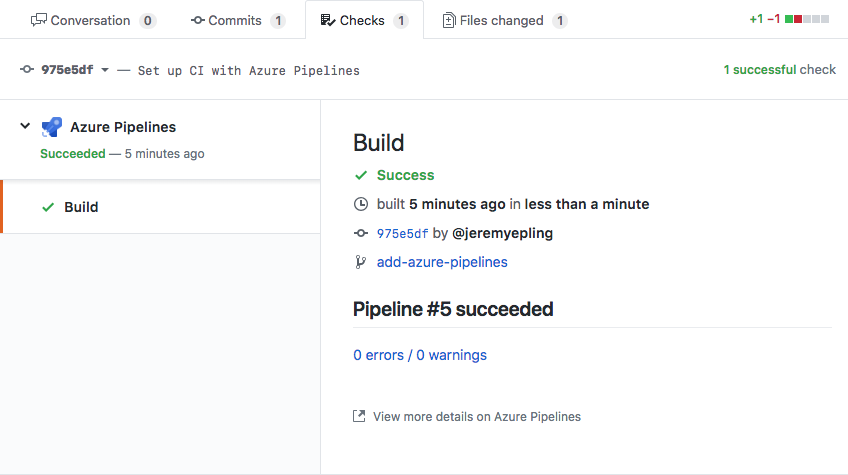
Automatically trigger your pipeline with changes to your repository when you connect Azure Pipelines with GitHub. Get rich status reports, annotated code, and detailed information—all within the GitHub interface.
Works with any platform
Build, test, and deploy applications to virtual machines; to cloud providers such as Azure, Amazon Web Services, and Google Cloud Platform; or to app stores across operating systems, including Android, iOS, Linux, macOS, and Windows systems. You can even take advantage of built-in tasks for Kubernetes, serverless, and VM deployments as well as a rich ecosystem of extensions for every language and tool.
Free for open source projects
Many open source repositories are already using Azure Pipelines for CI/CD, such as CPython, webpack, Visual Studio Code, TypeScript, Atom, and Electron. Get up and running quickly with unlimited build minutes, and up to 10 free parallel Microsoft-hosted build jobs across Linux, macOS, or Windows.
We’re constantly working towards building an ecosystem that values openness, provides equal opportunities to partners, and empowers developers with access to the right tools. While this integration offers improvements to the way you build with GitHub and Azure Pipelines, we know everyone has their own approach to CI. View a list of our CI partners in GitHub Marketplace to find a solution that works for you.
Interested in building on our platform? Contact us or visit GitHub Developer for more information.
Highlights from Git 2.19
- Sep 10, 2018
-
ttaylorr
- Community
The open source Git project just released Git 2.19, with features and bug-fixes from over 60 contributors. Here’s a look at some of the most interesting features introduced in the latest versions of Git.
Compare histories with git range-diff
You might have used git rebase, which is a powerful tool for rewriting history
by altering commits, commit order, or branch bases to name a few. Many people
do this to “polish” a series of commits before proposing to merge them into a
project. But how can we visualize the differences between two sets of commits,
before and after a rebase?
We can use git diff to show the difference between the two end states, but
that doesn’t provide information about the individual commits. And if the base
on which the commits were built has changed, the resulting state might be
quite different, even if the changes in the commits are largely the same.
Git 2.19 introduces git range-diff, a tool for comparing two sequences of
commits, including changes to their order, commit messages, and the actual
content changes they introduce.
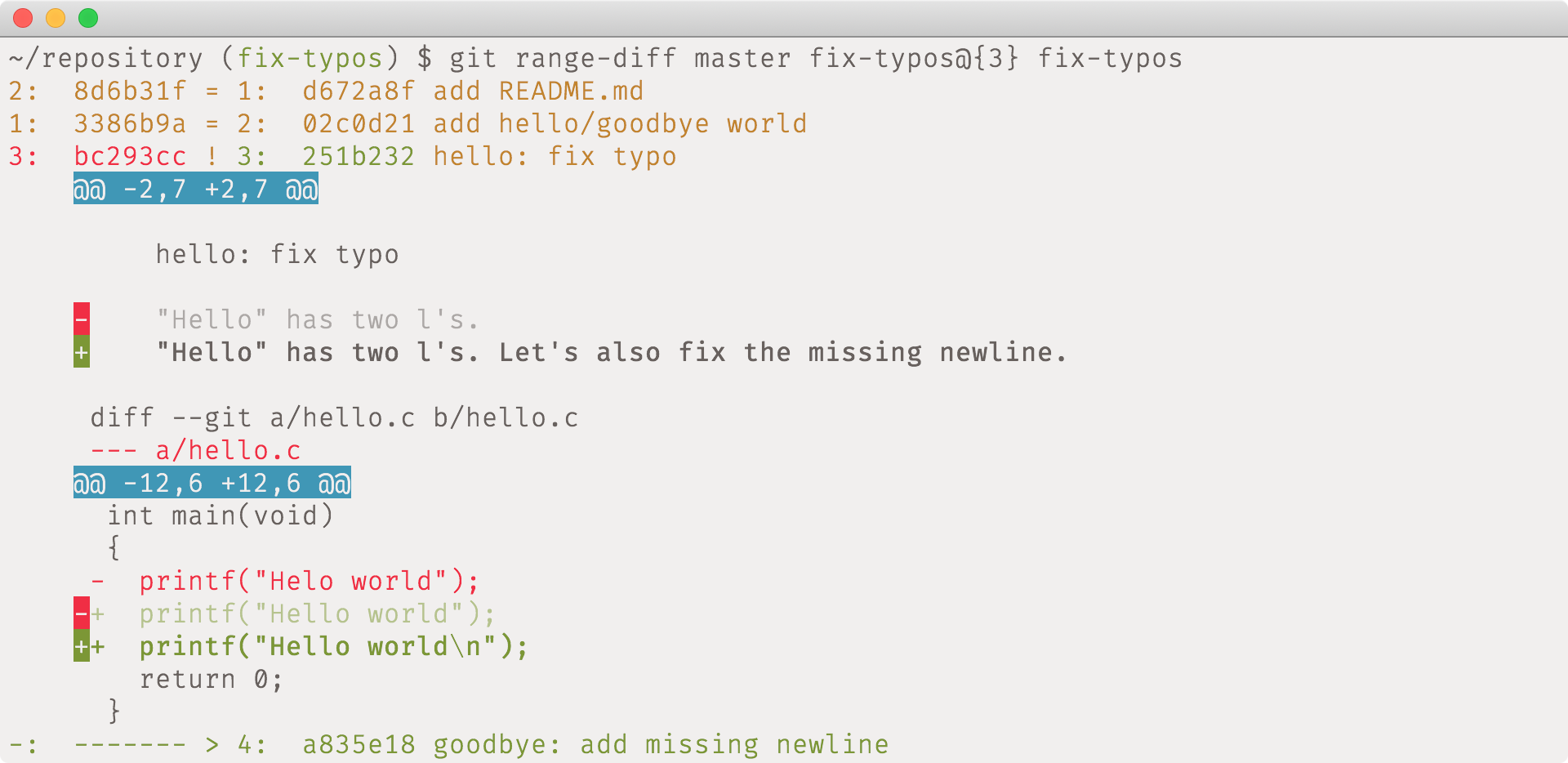
In this example, we rewrote a series of three commits, and compared the tips of
each version using git range-diff. git range-diff shows that we moved the
commit introducing README.md to be first instead of second, amended both the
commit message and body of the typo fix, and introduced a new commit to add a
missing newline.
[source]
git grep’s new tricks
When you search for a phrase using git grep, it’s often helpful to have
additional information pertaining to each match, such as its line number and
function context.
In Git 2.19 you can now locate the first matching column of your query with
git grep --column.
If you’re using Vim, you can also try out git-jump, a Git add-on that
converts useful locations in your code to jump locations in your text editor.
git-jump can take you to merge conflicts, diff hunks, and now, exact grep
locations with git grep --column.

git grep also learned the new -o option (meaning --only-matching). This is
useful if you have a non-trivial regular expression and want to gather only the
matching parts of your search.
For example, if you want to count all of the various ways that the Git source code spells “SHA-1” (e.g., “sha1”, “SHA1”, and so on):

(The other options -hiI are to omit the filename, search case-insensitively,
and ignore matches in binary files, respectively.)
Sorting branches
The git branch command, like git tag (and their scriptable counterpart, git
for-each-ref), takes a --sort option to let you order the results by a number
of properties. For example, to show branches in the order of most recent update,
you could use git branch --sort=-authordate. But if you always prefer that
order, typing that sort option can get tiresome.
Now, you can use the branch.sort config to set the default ordering of git
branch:
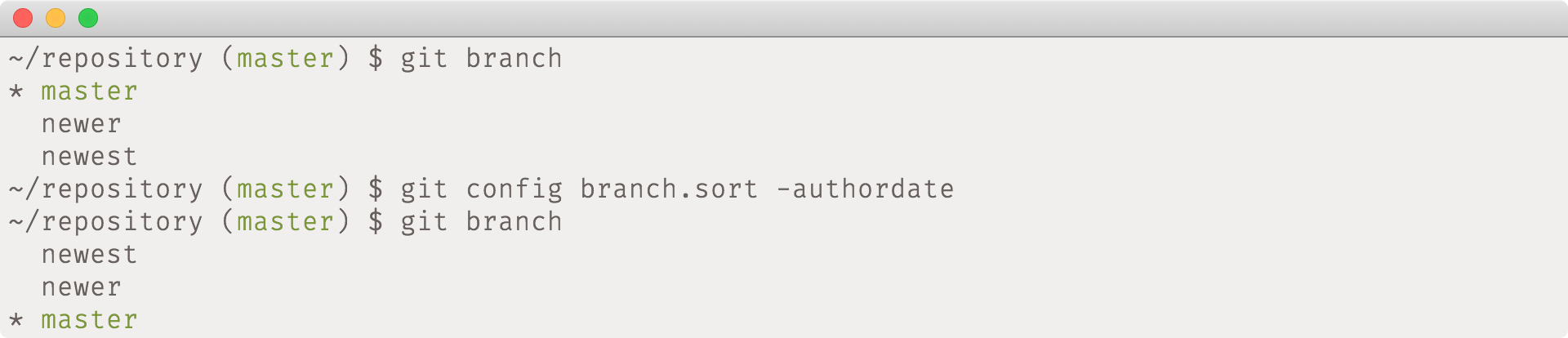
Note that by default, git branch sorts by refname, hence master is first and
newest is last. In the above example, we tell Git that we would instead prefer
the most recently updated branch first, and the rest in descending order. Hence,
newest is first and master is last.
You might also want to try these other sorting options:
--sort=numparentshows merges by how awesome they are--sort=refnamesorts branches alphabetically by their name (this is the default, but may be useful to override in your configuration)--sort=upstreamsorts branches by the remote from which they originate
[source]
Directory rename detection
Git has always detected renamed files as part of merges. For example, if one
branch moves a file from A to B and another modifies content in A, then
the resulting merge will apply that modification to the content’s new location
in B.
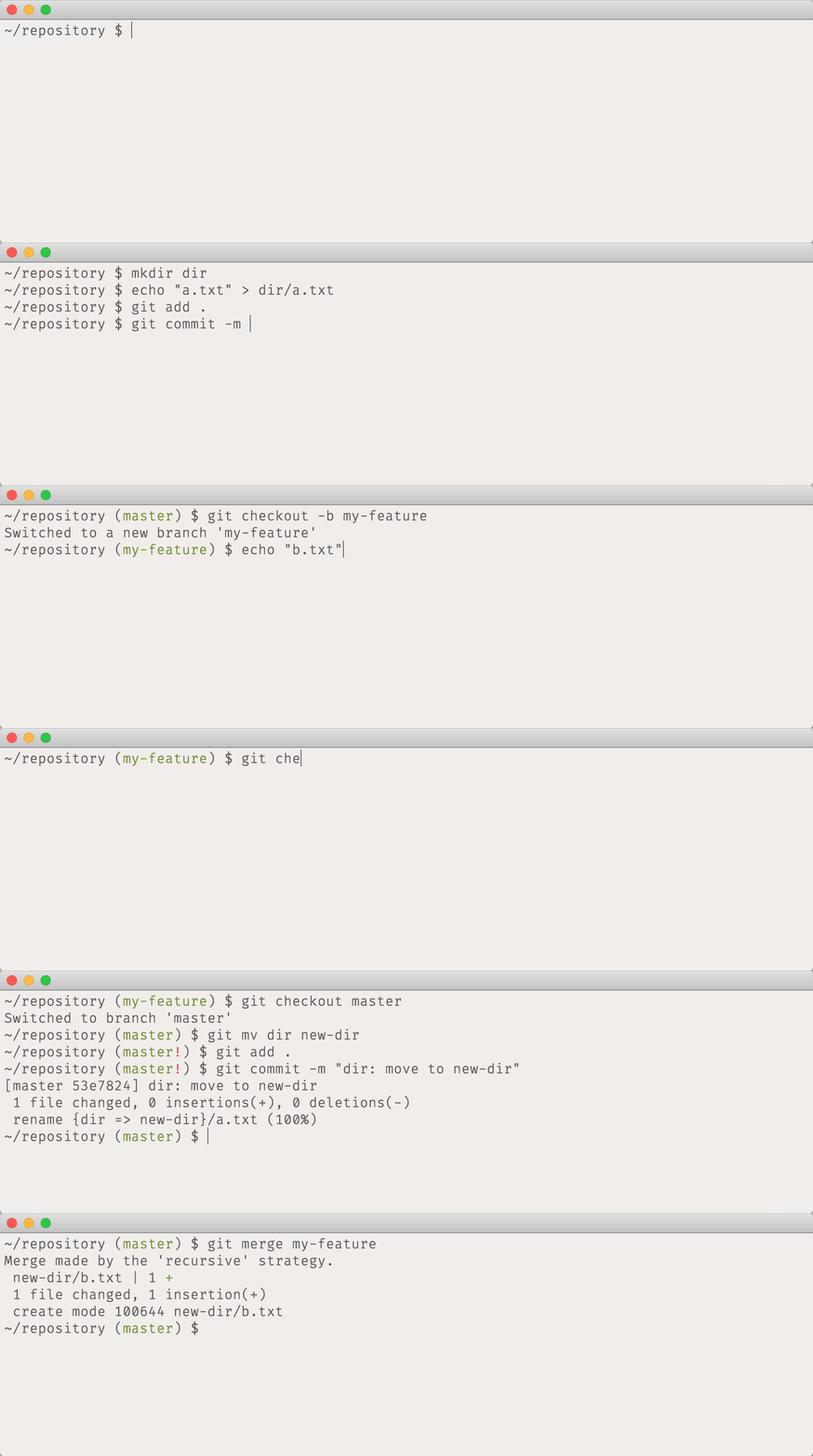
The same thing can happen with files in a directory. If one branch moves a
directory from A to B but another adds a new file A/file, we can infer
that the file should become B/file when the two are merged. In Git 2.18, git
merge does this whenever rename detection is enabled (which is by default).
[source]
Tidbits
-
In Git v2.18, a remote code execution vulnerability in
.gitmoduleswas fixed, where an attacker could execute scripts when the victim cloned with--recurse-submodules. If you haven’t upgraded, please do! The fix was also backported to v2.17.1, v2.16.4, v2.15.2, v2.14.4, and v2.13.7, so you’re safe if you’re running one of those. [source] -
Have you ever run into a Git command line option that should have tab-completed but didn’t? Keeping these up to date has long been an annoying source of manual work for the project, but now the completion of options for most commands is generated automatically (along with the list of commands itself, the names of config options, and more). [source, source, source, source]
-
gpgsigning and verification of commits and tags has been extended to work withgpgsm, which uses X.509 certificates instead of OpenPGP keys. These certificates may be easier to manage for centralized groups (e.g., developers working for a large enterprise). [source] -
To fetch a configuration variable with a “fallback” value, it’s common for scripts to say
git config core.myFoo || echo <default>. But that doesn’t give Git the opportunity to interpret<default>for you. When it comes to colors, this is especially important for instances where you ultimately need the ANSI color code, for say, “bold red”, but don’t want to type\033[1;31m.git confighas long supported this with a special--get-coloroption, but now there are options that can be applied uniformly to all types of config. For instance,git config --type=int --default=2M core.myIntwill expand the default to 2097152, andgit config --type=expiry --default=2.weeks.ago gc.pruneExpireconsistently returns a number of seconds. [source, source] -
Quick quiz: if
git tag -lis shorthand forgit tag --list, then what doesgit branch -ldo? If you thought, “surely it doesn’t list all branches”, then congratulations: you’re a veteran Git user!In fact,
git branch -lhas been used since 2006 to establish a reflog for a newly created branch, something that you probably didn’t care about since it became the default shortly after being introduced.That usage has been deprecated (you will receive a warning if you use
git
branch -l
), thus clearing the way forgit branch -lto meangit branch --list. [source] -
In our last post, we discussed the new
--color-movedoption, which (unsurprisingly) colors lines moved in a diff. The lines that were moved must be identical, meaning that the feature would miss re-indented code unless you specified a diff option such as--ignore-space-change. Keep in mind that this option would affect the whole diff, potentially missing space changes that you do care about. In Git 2.19, the whitespace for move detection can be configured independently with the new--color-moved-wsoption. [source] -
Many of Git’s commands are colorized, like
git diff,git status, and so on. Since 2.17, a few more commands improved their support for colorization, too.git blamelearned to colorize lines based on age or by group. Messages sent from a remote server are now colorized based on their keyword (e.g., “error”, “warning”, etc.). Finally, push errors are now painted red for increased visibility. [source, source, source] -
If you’ve ever run
git checkoutwith the name of a remote branch, you might know that Git will automatically create a local branch that tracks the remote one. However, if that branch name is found in more than one remote, Git does not know which to use, and simply gives up.In 2.19, Git learned the
checkout.defaultRemoteconfiguration, which specifies a remote to default to when resolving such an ambiguity. [source] -
Git interprets certain text encodings (e.g.
UTF-16) as binary, meaning that tools likegit diffwill not show a textual diff. Normally it’s recommended to store your text files asUTF-8, but this isn’t always possible if other tools generate or expect another encoding.You can now tell Git which encoding you prefer in your working tree on a per-file basis by setting the
working-tree-encodingattribute. This will cause Git to store the files asUTF-8internally, and convert them back to your preferred encoding on checkout. The result looks good ingit diff, as well as on hosting sites. [source]
Cooking
Some features are so big that they’re developed over the course of several releases. We have historically avoided reporting on works in progress in these posts, since the features are often still experimental, or there’s nothing you can directly start using.
That said, some of the topics upstream around this release are too exciting to ignore! So, here’s an incomplete summary of what’s happening upstream:
Partial clones
An important part of Git’s decentralized design is that all clones receive the full history of the project, making all clones true peers of one another. When there aren’t a large number of objects in your repository, things go quickly, but at a certain size clones can become frustratingly slow.
There’s ongoing work to allow “partial” clones which omit some blob and tree
objects, in favor of requesting objects from the server as-needed. You can see a
design overview of the feature, or even start experimenting yourself. Note
that most public servers do not yet support the feature, but you can play with
git clone --filter=blob:none against your local Git 2.19 install.
[source, source, source, source, source, source]
Commit graphs
Git has a very simple data model: everything is an object named after the hash
of its contents, and objects point to each other by those names. Many operations
walk the graph formed by those pointers. For example, asking “which releases
contain this bug-fix” is really “which tag objects have a path to walk back to
commit X” (where X is the commit fixing the aforementioned bug).
Those walks have traditionally required loading each object from disk to find its pointers. But now Git can compute and store properties of each commit in a more efficient format, leading to significantly faster traversals. You can read more about it in a series of blog posts from the feature’s author.
Protocol v2
Git still uses roughly the same protocol for fetching that was developed in 2005: after a client connects, the server dumps the current state of all branches and tags (called the “ref advertisement”), and then the client asks for the parts it needs to update. As repositories have grown, the cost of this advertisement has become a source of inefficiency.
The protocol has added new features over the years in a backwards-compatible way by negotiating capabilities between the server and client. But one thing that couldn’t be changed is the ref advertisement itself, because it happens before there’s a chance to negotiate.
Now there’s a new protocol which addresses this (and more), providing a way to transfer the advertisement more efficiently. Only a few servers support the new protocol so far, but you can read more about it in this blog post from its designer.
[source, source, source, source]
Transitioning away from SHA-1
We mentioned earlier that all Git objects are named according to a hash of their contents. You might know that the algorithm that determines the value of that hash is SHA-1, which has not been considered safe for some time. In fact, a collision attack was discovered and published last year, which we wrote about in our post on its remediation.
Though SHA-1 collisions in Git are unlikely in practice, the Git project has decided to pick a new hashing algorithm and has made significant progress towards implementing it. Git has chosen SHA-256 as the successor to SHA-1, and is working through the transition plan to convert to it.
[source]
And everything else
That’s just a sampling of changes from the last few versions. Read the full release notes for 2.19, or find the release notes for previous versions in the Git repository.