Introducing the Checks API, a better way to connect integrations and code
- May 07, 2018
-
jasoncwarner
- Announcements
Over 600,000 repositories received statuses in January 2018 alone—more than a 50 percent increase from last year—and now statuses will provide you with more information than ever. Today we’re introducing the public beta release of the Checks API, a better way to get feedback from integrations on your code. The Checks API allows you to build sophisticated tools for continuous integration (CI), linting, and acceptance testing on GitHub. This new functionality currently works with the GitHub REST API, with GraphQL support coming soon.
What’s new
Instead of pass/fail build statuses, your integrations can now report richer results, annotate code with detailed information, and kick off reruns—all within the GitHub user interface.
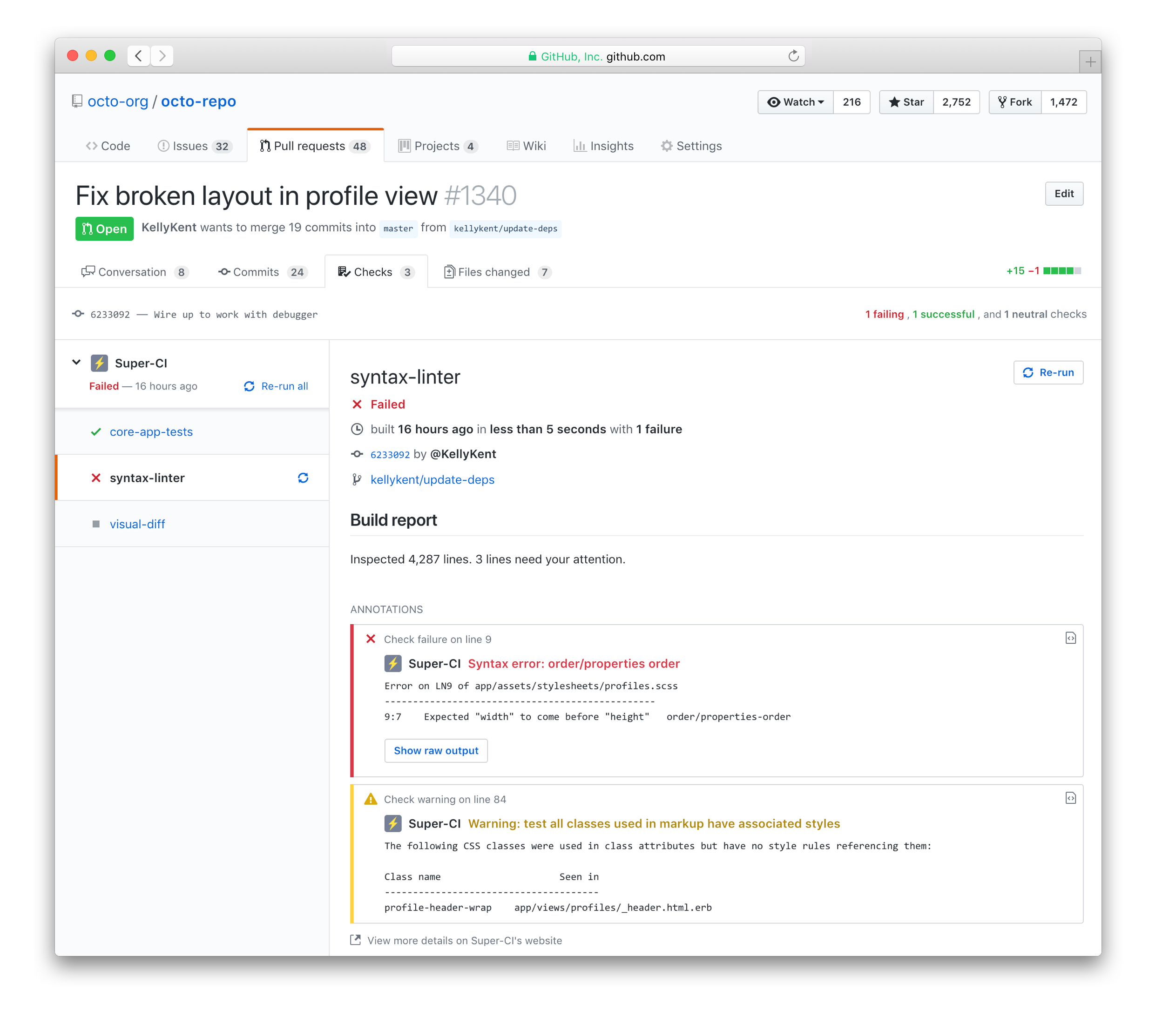
Build outputs are now accessible with the new “Checks” tab on pull requests. Inline annotations are simple to find, too. They’ll appear right alongside the relevant code in the pull request, so you can identify and address failing checks even faster.
Learn more about the Checks API
Over the last several weeks, we’ve worked closely with partners on fine-tuning the Checks experience—and we’re excited to share several apps already using the API.
Microsoft Visual Studio App Center and Outlook integration
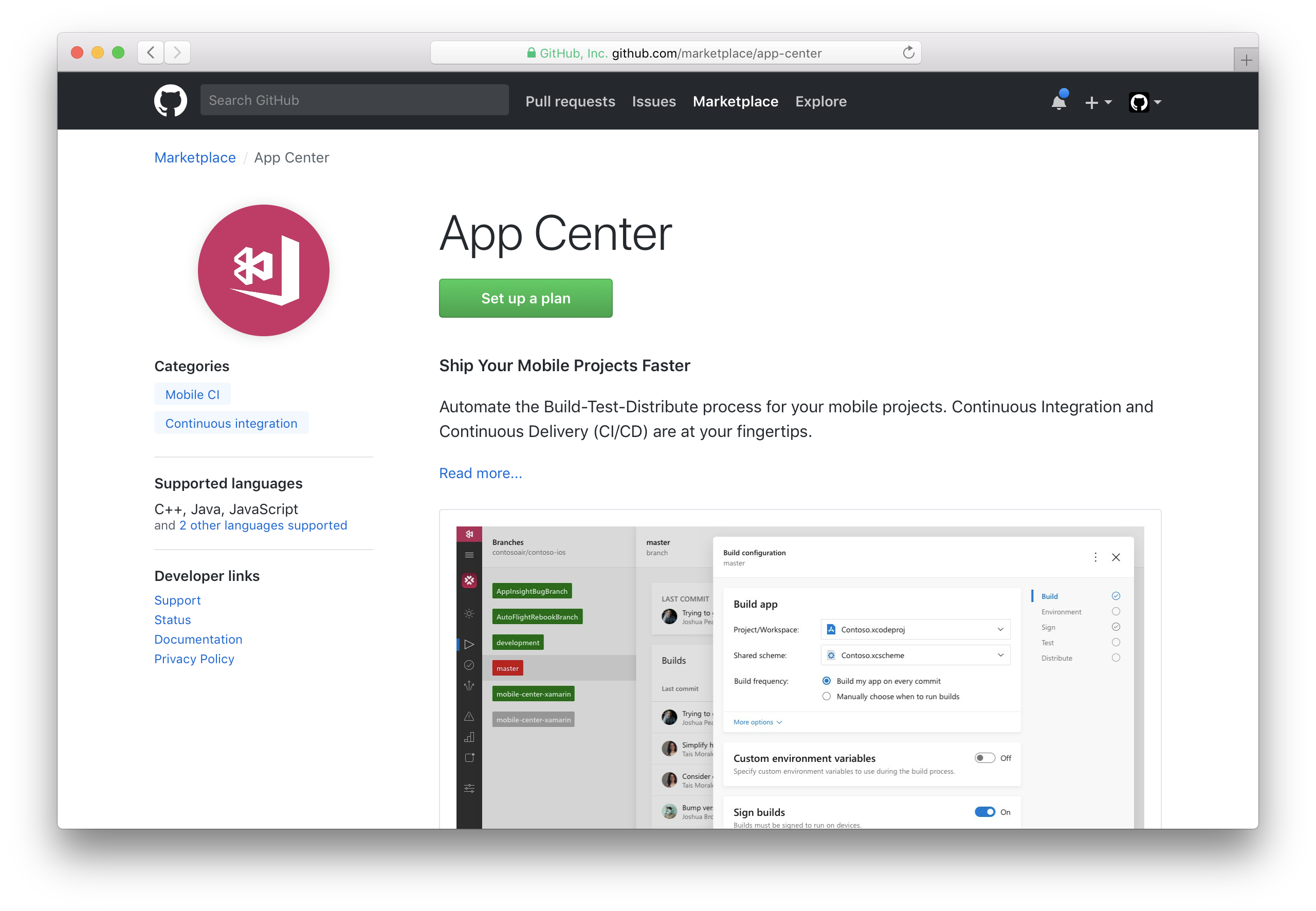
Microsoft maintains hundreds of open source projects on GitHub, including Visual Studio Code, which had the most community participants among any project last year, and TypeScript, one of the fastest growing languages in 2017. Now we’re partnering with Microsoft to integrate Azure’s DevOps services with GitHub, starting with Azure’s Mobile CI service. GitHub will detect mobile projects and suggest developers set up mobile CI using any one of our providers, including App Center.
With App Center installed, you can automate builds on every commit, test apps on real devices in the cloud, and monitor usage with crash and analytics data. And because the App Center integration uses the Checks API, mobile developers will be able to see the results directly within GitHub’s interface.
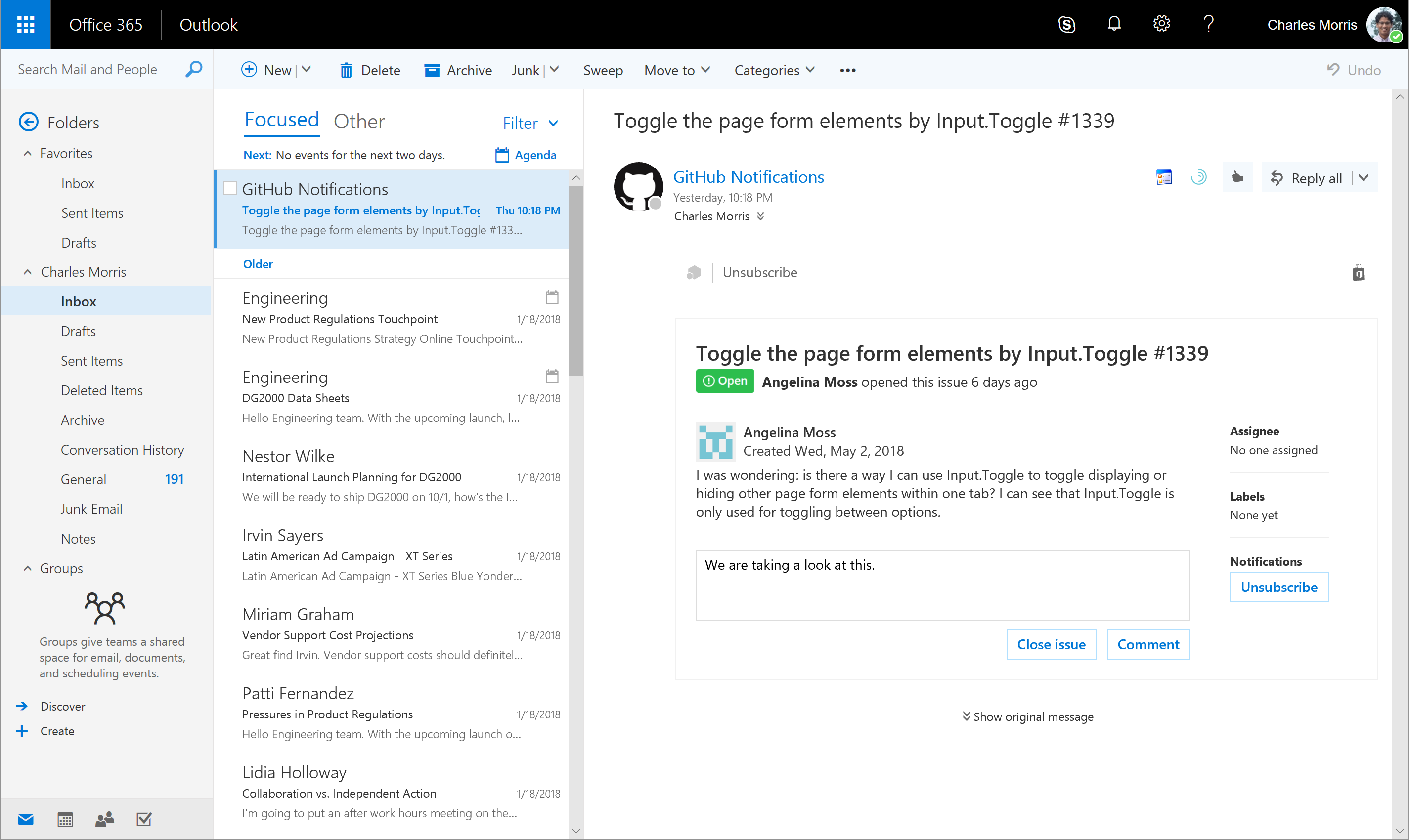
To provide you with simple, streamlined experiences for tools you already use, we’re also integrating GitHub with Microsoft Outlook using Adaptive Cards. Over the next several weeks, Outlook users will be able to comment on issues from their inbox—and soon after, be able to merge pull requests, too.
Travis CI integration
As a leading provider of hosted CI, Travis CI has been helping build and test open source and private projects for more than seven years. Travis CI recently adopted GitHub Apps and now includes Checks as a way for your team to share the results of your project’s branch and pull request builds. View your build’s stages, jobs, and results, including the config associated with them to get a complete picture of the health of your projects directly from GitHub. You can also rerun builds from within the GitHub Checks UI.
Learn more about Travis CI integration with the Checks API
CircleCI integration
Speed up your test and development cycle without extra maintenance. Follow your GitHub project from CircleCI, and set up your first build in no time thanks to CircleCI’s automatically generated build and test steps and simple extensibility. Checks API compatibility with CircleCI is on the way.
Today’s announcement is just the start. We’ll continue shipping new ways for you to make the most of GitHub and build useful, powerful tools that work seamlessly with our platform. With easy access to an open ecosystem of applications, you can create fast and flexible workflows that help you focus on what matters most.
Introducing the GitHub Changelog
- May 03, 2018
-
camicano
- Announcements
Today we’re introducing the GitHub Changelog–a chronological list of user-facing changes, large and small, made to the GitHub platform.
We regularly ship incremental improvements to make your GitHub experience even better. The changelog will supplement major release announcements on the GitHub Blog, encompassing smaller ships and enhancements you might not hear about otherwise. These include new features, security updates, deprecations, improvements, and more. Each entry will provide a short description of changes and direct you to additional resources, like documentation or blog posts.
Subscribe to the changelog or follow the official GitHub Changelog Twitter account to hear about updates as they happen.
GitHub open sources its Statement Against Modern Slavery and Child Labor
- May 03, 2018
-
vollmera
- Policy
As part of our work to open source policies for other companies to adapt and use, and in accordance with the UK Modern Slavery Act, we’ve included our Statement Against Modern Slavery and Child Labor in the latest round of updates to our Site Policy repository.
While modern slavery (slavery, forced or compulsory labor, trafficking, servitude, and workers who are imprisoned, indentured, or bonded) and child labor are not typically associated with software, businesses in all industries are increasingly recognizing that there are possibilities for these abuses to occur in their own labor force or through their sourcing practices.
We have no reason to believe modern slavery or child labor is occurring in our business or supply chain, and we have outlined our policies and due diligence processes to help ensure it won’t happen in the future. Given the abhorrent nature of modern slavery and child labor, prohibiting these atrocities in our business and supply chain is a logical and important commitment for GitHub to make.
While publishing a statement is a requirement for certain businesses under UK law, our statement goes beyond the requirements of that law by holding our suppliers to our statement too. Our statement also highlights our partnership with the FairHotel Program, through which we encourage GitHub employees to choose hotels where workers are paid fair wages, receive adequate benefits, and have a voice on the job. To ensure our commitment to preventing modern slavery and child labor in our business and supply chain, we’ll publish a new statement annually, building on our previous statements.
GitHub is excited to participate in this year’s RightsCon on May 16-18, where we will discuss this statement and other human rights-oriented aspects of our work. Look for us there!
A year of GitHub Desktop on Electron
- May 02, 2018
-
telliott27
- Data
We announced the public beta of the open source, Electron-built version of GitHub Desktop a year ago, giving the GitHub community a unified GitHub experience for macOS and Windows. With every release, including the version 1.0 in September 2017, we’ve seen more people using GitHub Desktop to improve their workflows. Less than six months after 1.0 was released, more Desktop users were using the Electron-based version than both the classic versions for Mac and Windows combined.
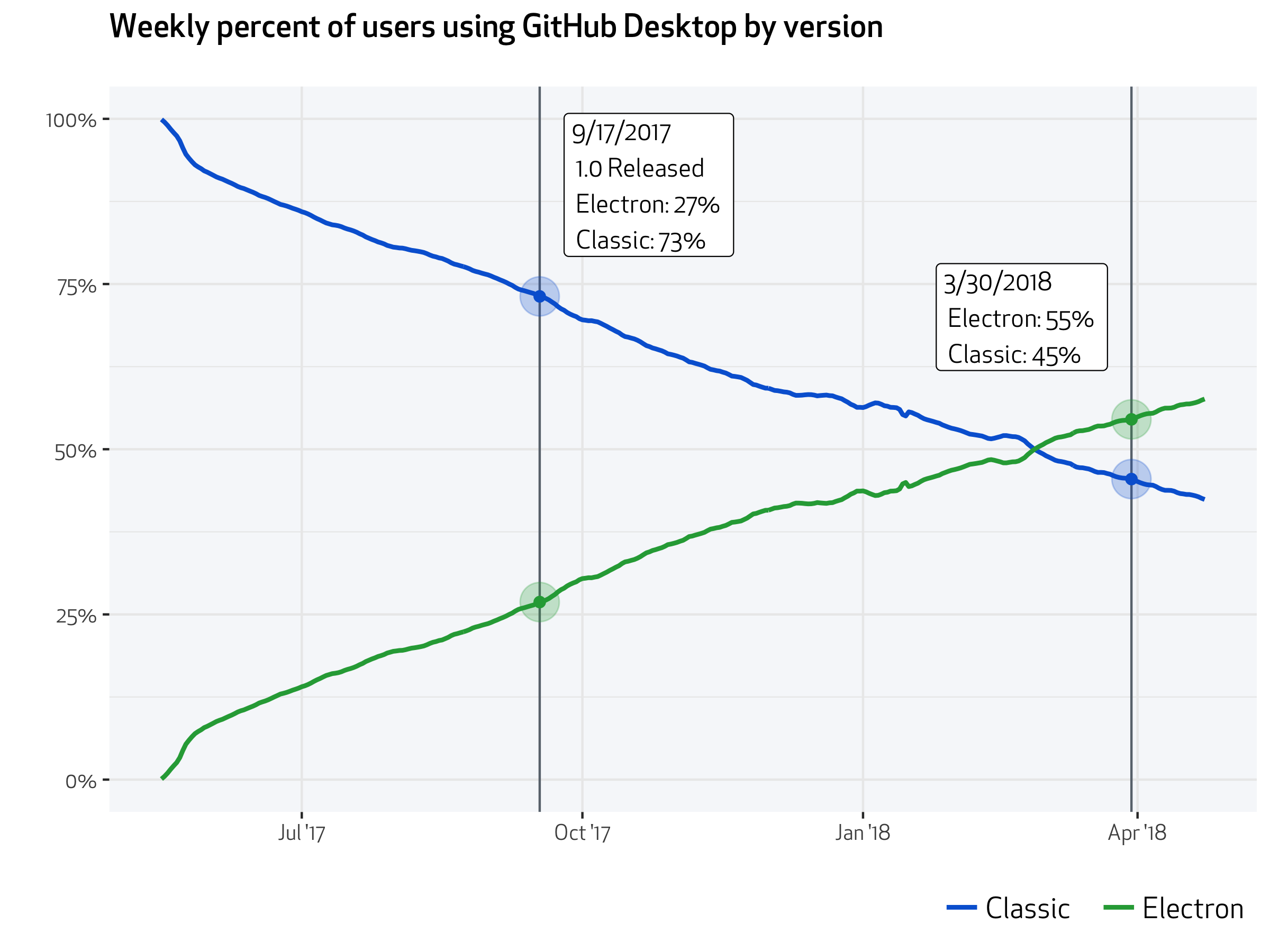
Since its initial release, we’ve added more features to GitHub Desktop, including support for additional external editors, syntax highlighting support for additional languages, support for adding co-authors to commits, and the ability to view and checkout pull requests from collaborators or forks. Many of these new features were contributions from the open source community.
Starting today, if you’re still using the classic app, you’ll see in-app notifications suggesting an upgrade to the new GitHub Desktop with information on what’s changed. If you are still using GitHub for Mac or GitHub for Windows, or if you’ve never used our desktop apps, try out the new GitHub Desktop.
Issue template improvements
- May 02, 2018
-
venetucci
- Announcements
As more people contribute to your project, the issue tracker can start to feel hectic. We recently helped project maintainers set up multiple issue templates as a way to manage contributions, and now we’re following up with a better contributor experience and improved setup process.
When someone opens a new issue in your project, you can now prompt them to choose from multiple issue types.
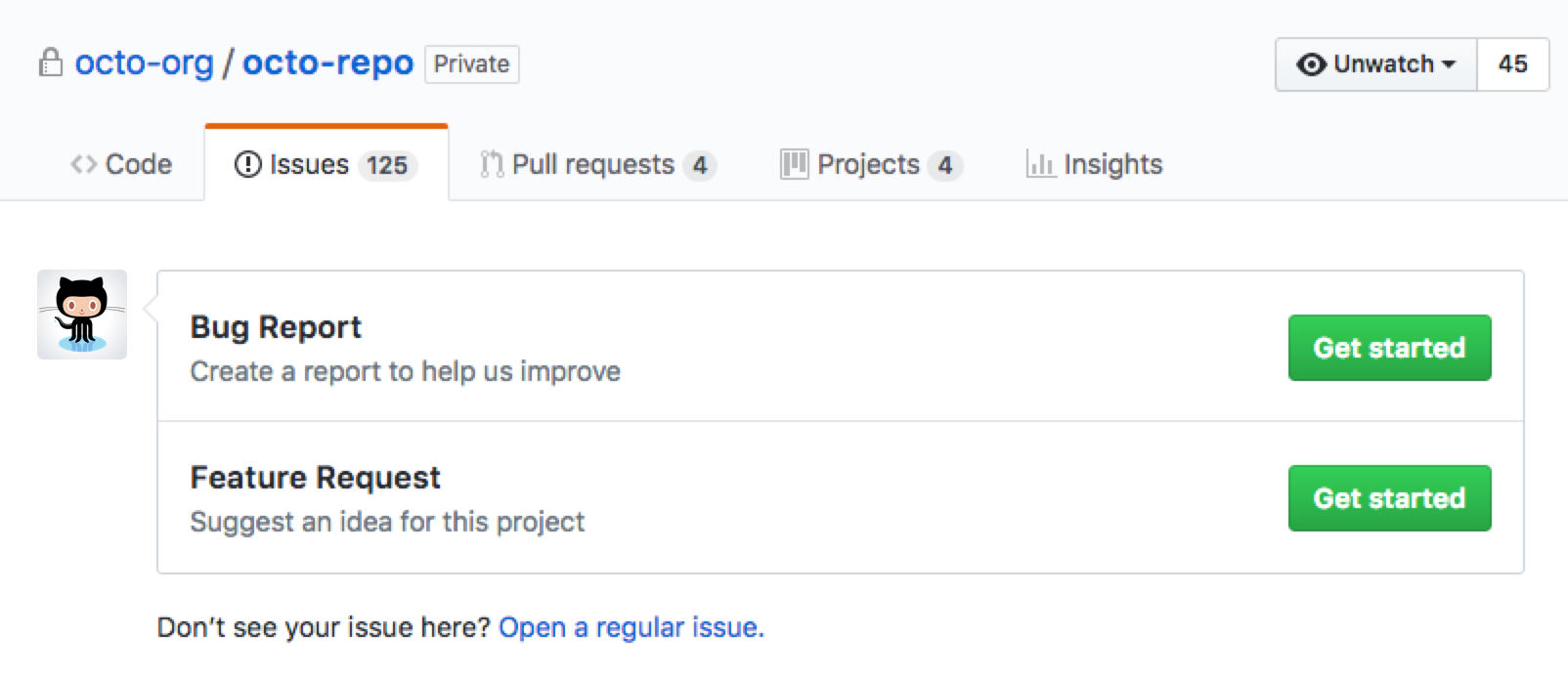
To add this experience to your repository, go to the “Settings” tab and click Set up templates—or add a template from your community profile. You’ll be able to use a builder to preview and edit existing templates or create a custom template.
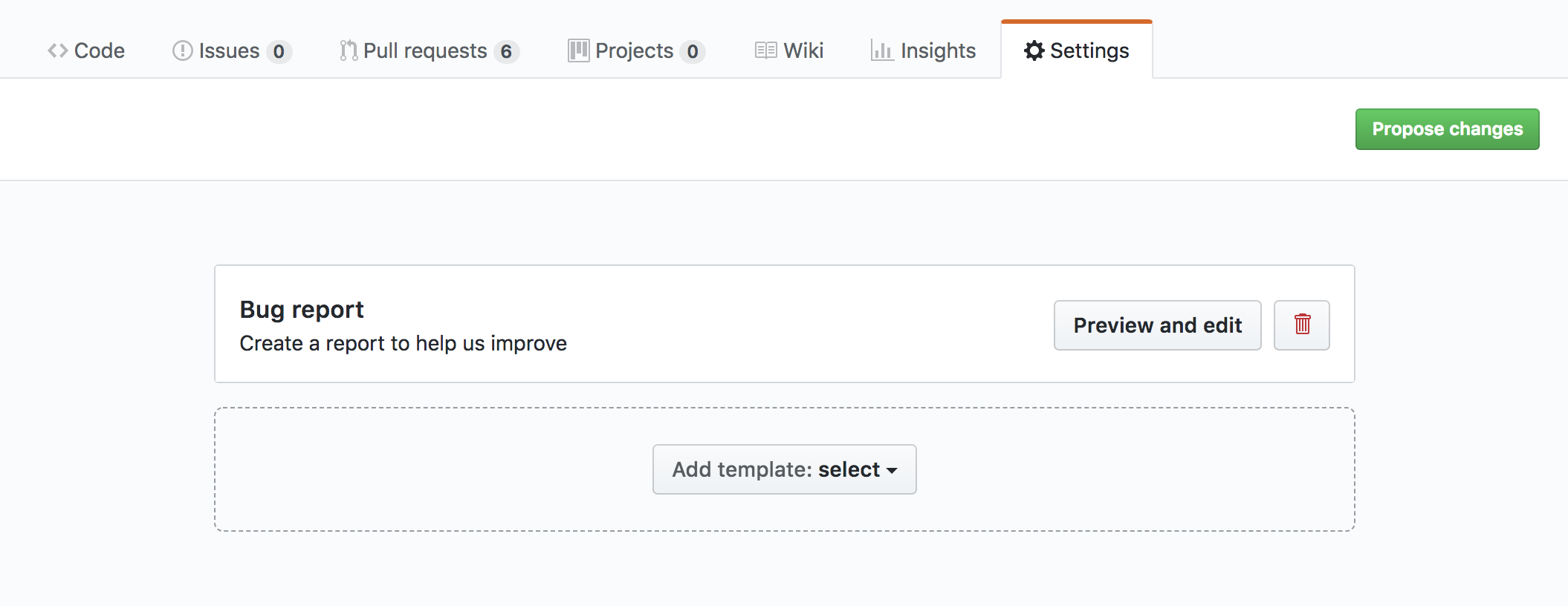
Once these changes are merged into master, the new issue templates will be live for contributors. Head over to your project settings to get started.