A Zettelkasten note-taking plugin for Neovim, written in Lua.
- 📘 Intro
- ✨ Features
- 📦 Installation
- 🔧 Configuration
- ⚙️ Commands
- ⌨️ Key Bindings
- 🎨 Browser Format
- 🔍 Picker Integration
- 🔭 Telescope Integration
- 📅 Calendar Extension
- 💬 Chat Integration
- 🐞 Debug
- 📸 Screenshots
- 📣 Self-Promotion
- 🙏 Credits
- 💬 Feedback
zettelkasten.nvim brings Zettelkasten-style note-taking into Neovim.
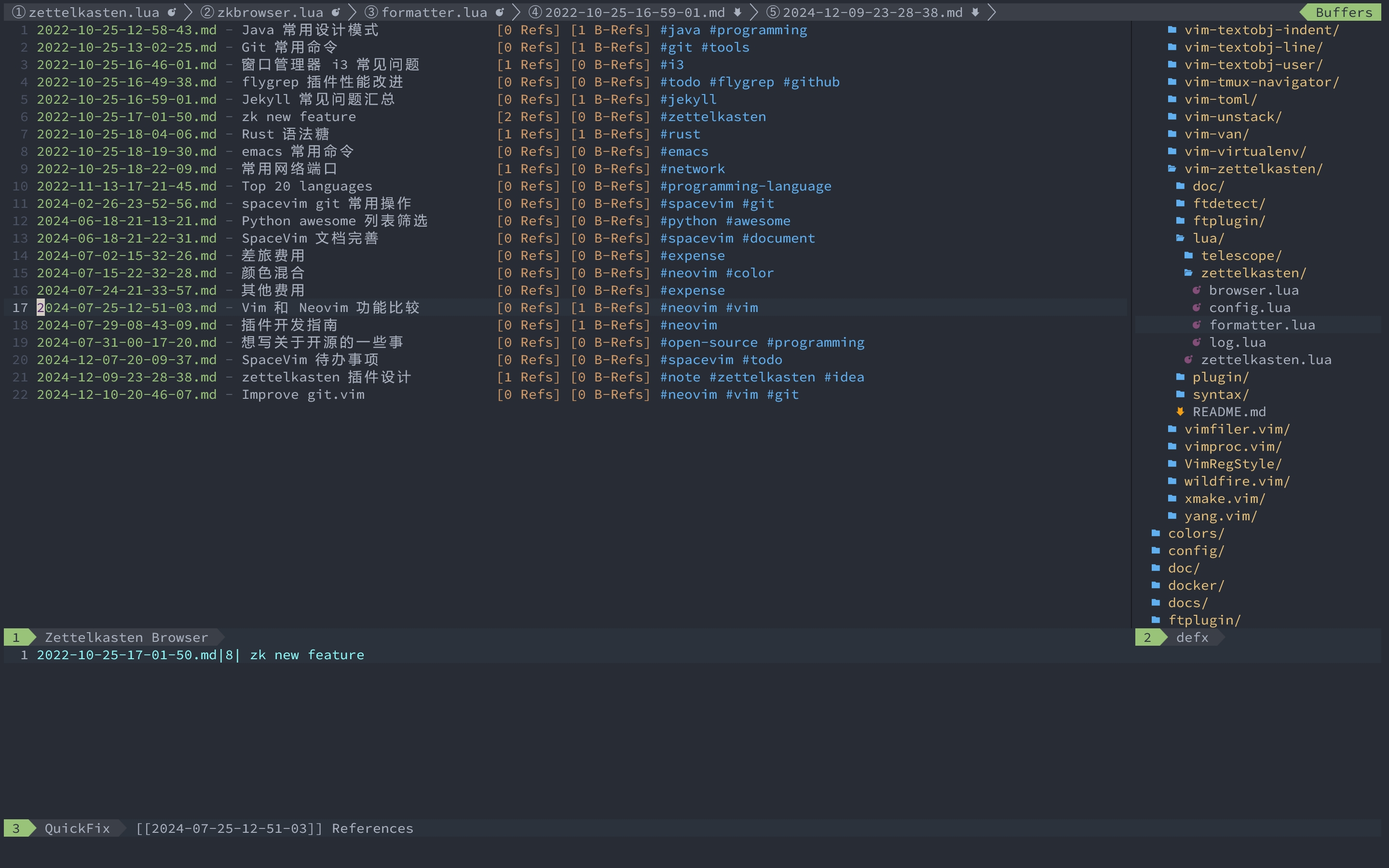
Notes are stored as Markdown files with timestamp-based IDs, and the plugin provides a browser
window, tags sidebar, reference/backlink tracking, completion, and integrations with picker.nvim,
telescope.nvim, calendar.nvim, and chat.nvim.
- 📝 Zettelkasten Notes - Create notes with timestamp-based IDs (
YYYY-MM-DD-HH-MM-SS.md) - 🗂️ Note Browser - Browse all notes in a dedicated window with customizable format
- 🏷️ Tags Sidebar - Foldable tag tree for visual tag-based filtering
- 🔗 References & Backlinks - Automatic
[[note-id]]reference detection and backlink tracking - ✏️ Completion - Note ID and tag completion via
completefuncandtagfunc - 📋 Quickfix Integration - List back references in the quickfix/location window
- 🖼️ Clipboard Image Paste - Paste images from clipboard directly into notes (macOS/Linux/Windows)
- 🔍 Multi-Picker Support - Integrates with picker.nvim and telescope.nvim
- 📅 Calendar Integration - Highlights dates with notes via calendar.nvim
- 💬 Chat Integration - Create and retrieve notes via chat.nvim
- 🧩 Note Templates - Create notes from pre-defined templates
Using nvim-plug:
require('plug').add({
    {
        'wsdjeg/zettelkasten.nvim',
        config = function()
            require('zettelkasten').setup({
                notes_path = '~/.zettelkasten',
                template_dir = '~/.zettelkasten_template',
                preview_command = 'pedit',
                browseformat = '%f - %h [%r Refs] [%b B-Refs] %t',
            })
            vim.keymap.set('n', '<leader>mzb', '<cmd>ZkBrowse<cr>', { silent = true })
            vim.keymap.set('n', '<leader>mzn', '<cmd>ZkNew<cr>', { silent = true })
        end,
    },
})
Using LuaRocks:
luarocks install zettelkasten.nvimAll options are passed to require('zettelkasten').setup({}):
| Option | Type | Default | Description |
|---|---|---|---|
notes_path |
string | '~/.zettelkasten/' |
Directory where notes are stored |
template_dir |
string | '~/.zettelkasten_template' |
Directory containing note templates |
preview_command |
string | 'pedit' |
Vim command used for note preview |
browseformat |
string | '%f - %h [%r Refs] [%b B-Refs] %t' |
Format string for the browser window (see Browser Format) |
completion_kind |
string | '[zettelkasten]' |
Kind label shown in completion menu |
browse_title_width |
number | 30 |
Max display width for note titles in the browser |
| Command | Description |
|---|---|
:ZkNew |
Create a new zettelkasten note |
:ZkBrowse [tags...] |
Open the note browser; optional tag arguments to filter |
:ZkHover [-preview] [-return-lines] [word] |
Show note info in a notification; -preview opens preview window, -return-lines returns full content |
| Key | Description |
|---|---|
F2 |
Open the zettelkasten tags sidebar |
<LeftRelease> |
Filter notes by the tag under cursor |
<Enter> / gf |
Open the note under cursor |
Ctrl-l |
Clear tag filter and reload all notes |
Ctrl-] / K |
Preview note via keywordprg (:ZkHover -preview) |
[I |
List back references in the quickfix window |
Ctrl-x Ctrl-u |
Complete note ID or tags (insert mode) |
q |
Close the browser window |
| Key | Description |
|---|---|
<Enter> |
Filter browser notes by the tag under cursor |
<LeftRelease> |
Filter by tag, or toggle fold on fold markers |
F2 / q |
Close the tags sidebar |
| Key | Description |
|---|---|
<Leader>p |
Paste image from clipboard into the note |
K |
Hover note info (:ZkHover) |
[I |
List back references in the quickfix window |
Ctrl-] |
Jump to [[note-id]] reference via tagfunc |
Ctrl-x Ctrl-u |
Complete note ID or tags (insert mode) |
The browseformat option controls how each note is displayed in the browser window.
The following modifiers are supported:
| Modifier | Description |
|---|---|
%f |
File name (e.g. 2024-01-15-10-30-00.md) |
%h |
Note title (padded/truncated to browse_title_width) |
%d |
Note ID (timestamp) |
%r |
Number of references (outgoing [[links]]) |
%b |
Number of back references (incoming links) |
%t |
Space-separated tags |
zettelkasten.nvim provides sources for picker.nvim:
:Picker zettelkasten
:Picker zettelkasten_tag
:Picker zettelkasten_template
| Source | Description |
|---|---|
zettelkasten |
Fuzzy find notes, open or insert note ID |
zettelkasten_tag |
Fuzzy find tags, filter browser by selection |
zettelkasten_template |
Fuzzy find templates, create note from selection |
Key bindings in picker sources:
| Key | Description |
|---|---|
<Enter> |
Default action (open note / filter / create) |
<C-y> |
Insert selected note's ID at cursor position |
zettelkasten.nvim also provides extensions for telescope.nvim:
require('telescope').load_extension('zettelkasten')
require('telescope').load_extension('zettelkasten_tags')
require('telescope').load_extension('zettelkasten_template')| Command | Description |
|---|---|
:Telescope zettelkasten |
Find and open notes |
:Telescope zettelkasten_tags |
Find and filter by tags |
:Telescope zettelkasten_template |
Find and create from templates |
zettelkasten.nvim provides an extension for calendar.nvim. It highlights dates that have zettelkasten notes associated with them.
When pressing <Enter> on a date in the calendar, the following actions are available:
- Create a daily note - Creates a new note with the selected date
- Browse daily notes - Opens the browser filtered by the selected date
zettelkasten.nvim provides two tools for chat.nvim:
@zk create <title>
Creates a new zettelkasten note with automatic ID generation and tag support.
Parameters:
title(string, required): The title of the notecontent(string, required): The main body content of the notetags(array of strings, optional): Tags for categorizing the note (e.g.,["programming", "vim"])
The note file is formatted as:
# <id> <title>

tags: #tag1 #tag2

<content>
@zk get <tags>
Retrieves zettelkasten notes by tags. Returns a JSON array of matching notes with file_name and title fields.
Debug zettelkasten.nvim with logger.nvim:
require('plug').add({
    {
        'wsdjeg/zettelkasten.nvim',
        depends = { { 'wsdjeg/logger.nvim' } },
    },
})


Like this plugin? Star the repository on GitHub.
Love this plugin? Follow me on GitHub.
This plugin is forked from Furkanzmc/zettelkasten.nvim.
New features added in this fork:
- Tags sidebar with foldable tag tree for visual filtering
- Tag completion in
completefunc(detects#prefix context) - Clipboard image paste (macOS / Linux / Windows)
- Note templates and custom-date note creation via
zknew(opt) - Calendar.nvim, picker.nvim, telescope.nvim, and chat.nvim integrations
- LuaRocks support and release-please automation
Improvements over upstream:
- Nil-safety and file-handle cleanup in note parsing
- Duplicate note ID guard in
set_note_id - Read-only browser buffer with richer keybindings (
q,<Enter>,<C-l>,<F2>) - CJK-aware title truncation in the browser formatter
- Simplified config (module-level fields instead of
config.get()) - Comprehensive unit test suite with luaunit
If you encounter any bugs or have suggestions, please file an issue in the issue tracker.