> ## Documentation Index
> Fetch the complete documentation index at: https://docs.bytebase.com/llms.txt
> Use this file to discover all available pages before exploring further.
# Codify SQL Review Policies with Bytebase API
Bytebase is a database DevSecOps platform designed for developers, security, DBA, and platform engineering teams. While it offers an intuitive GUI for managing database schema changes and access control, some teams may want to integrate Bytebase into their existing DevOps platforms using the [Bytebase API](/integrations/api/overview/).
This tutorial will guide you through configuring SQL review rules using the Bytebase API. This approach allows you to manage SQL review rules as code within your repository, enabling DBAs or platform engineering teams to apply them to Bytebase as needed. The tutorial repository is at [https://github.com/bytebase/example-api/tree/main/sql-review](https://github.com/bytebase/example-api/tree/main/sql-review).
This is one of the tutorial series of SQL Review:
1. [SQL Review with Bytebase GUI](/tutorials/sql-review-gui/)
2. SQL Review with CI (integrated with Database GitOps workflow):
* [Database GitOps with GitHub Actions](/tutorials/gitops-github-workflow/#step-3-configure-sql-review-in-bytebase)
* [Database GitOps with Azure DevOps](/tutorials/gitops-azure-devops-workflow/#step-3-configure-sql-review-in-bytebase)
* [Database GitOps with GitLab CI](/tutorials/gitops-gitlab-workflow/#step-3-configure-sql-review-in-bytebase)
* [Database GitOps with Bitbucket Pipelines](/tutorials/gitops-bitbucket-workflow/#step-3-configure-sql-review-in-bytebase)
3. [SQL Review with Bytebase API](/tutorials/sql-review-api/)
4. Codify SQL Review Policies with Bytebase API (this one)
## Prerequisites
1. [Docker](https://www.docker.com/) installed
2. Node.js >= v18
## Start Bytebase
Make sure your Docker daemon is running. Copy and paste the commands to start Bytebase.
```bash theme={null}
docker run --rm --init \
--name bytebase \
--publish 8080:8080 --pull always \
--volume ~/.bytebase/data:/var/opt/bytebase \
bytebase/bytebase:latest
```
Bytebase is now running via Docker, and you can access it via `localhost:8080`. Register the first admin account which will be granted [`Workspace Admin`](/administration/roles).
## Create Service Account
1. Log in as `Workspace Admin`, and go to **IAM & Admin** > **Users & Groups**. Click **+ Add User**, fill in with `api-sample`, choose the `Workspace DBA` role sufficient for this tutorial and click **Confirm**.
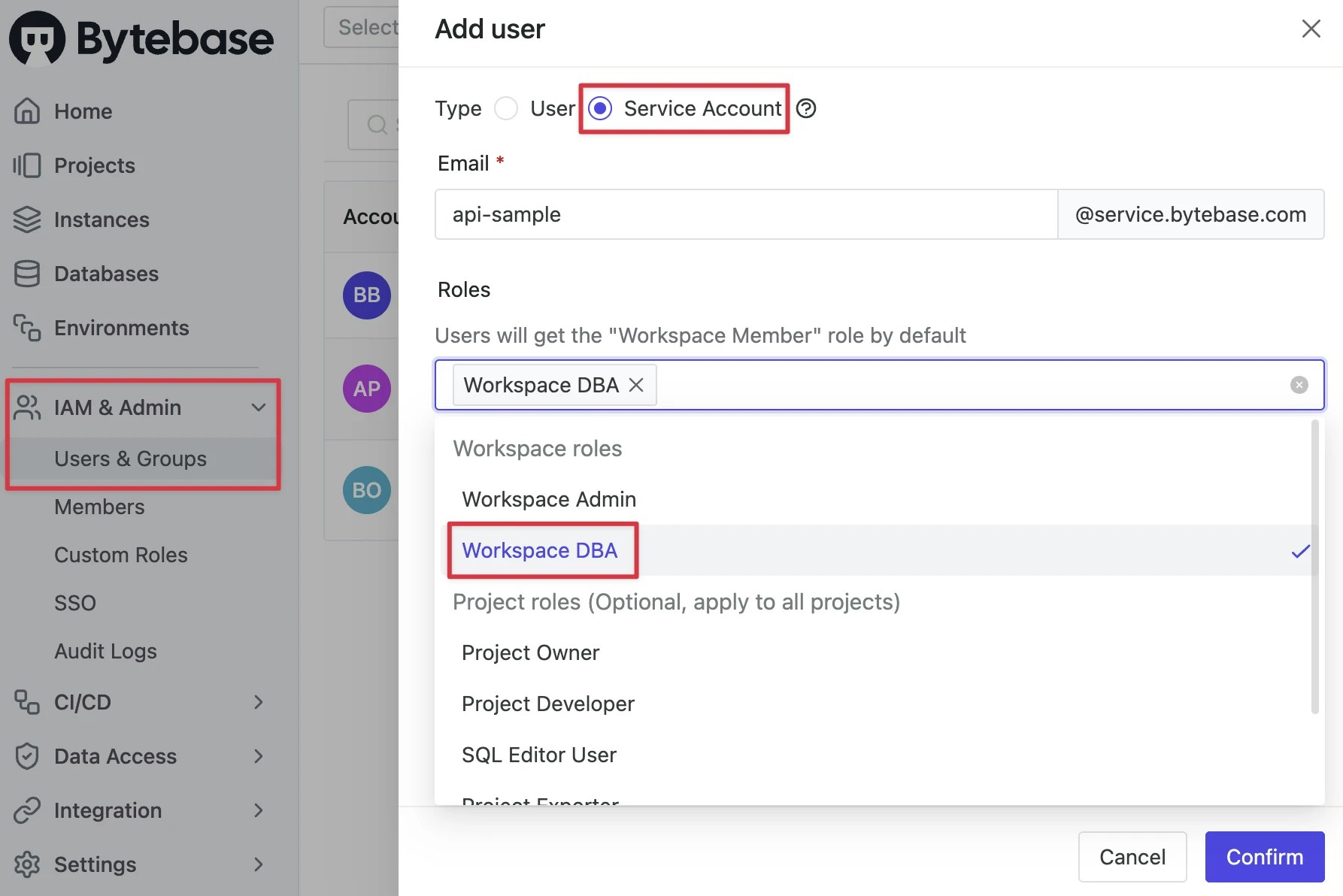 2. Find the newly created service account and **Copy Service Key**. We will use this token to authenticate the API calls.
 ## Obtain the Access Token
1. Go to [Bytebase API Example repo](https://github.com/bytebase/example-api) and clone it.
2. Navigate to the `sql-review` subfolder and follow the instructions in the `README.md` file of the example code repository to execute the scripts.
3. Replace `bytebase_url`, `bytebase_account`, and `bytebase_password` in the commands below with your own values, then run them to obtain a `bytebase_token` in your terminal.
```bash theme={null}
export bytebase_url=http://localhost:8080
export bytebase_account=api-sample@service.bytebase.com
export bytebase_password=bbs_************ilcLVG
bytebase_token=$(curl -s ${bytebase_url}/v1/auth/login \
--data-raw '{"email":"'${bytebase_account}'","password":"'${bytebase_password}'"}' \
--compressed | grep -o '"token":"[^"]*"' | sed 's/"token":"//; s/"$//')
echo $bytebase_token
```
## Configure SQL Review Policies
1. Continue following the `README.md` to run the scripts.
```bash theme={null}
curl --request PATCH "${bytebase_url}/v1/reviewConfigs/basic?allow_missing=true&update_mask=rules" \
--header 'Authorization: Bearer '${bytebase_token} \
--data @policy/basic.json
curl --request PATCH "${bytebase_url}/v1/reviewConfigs/advanced?allow_missing=true&update_mask=rules" \
--header 'Authorization: Bearer '${bytebase_token} \
--data @policy/advanced.json
```
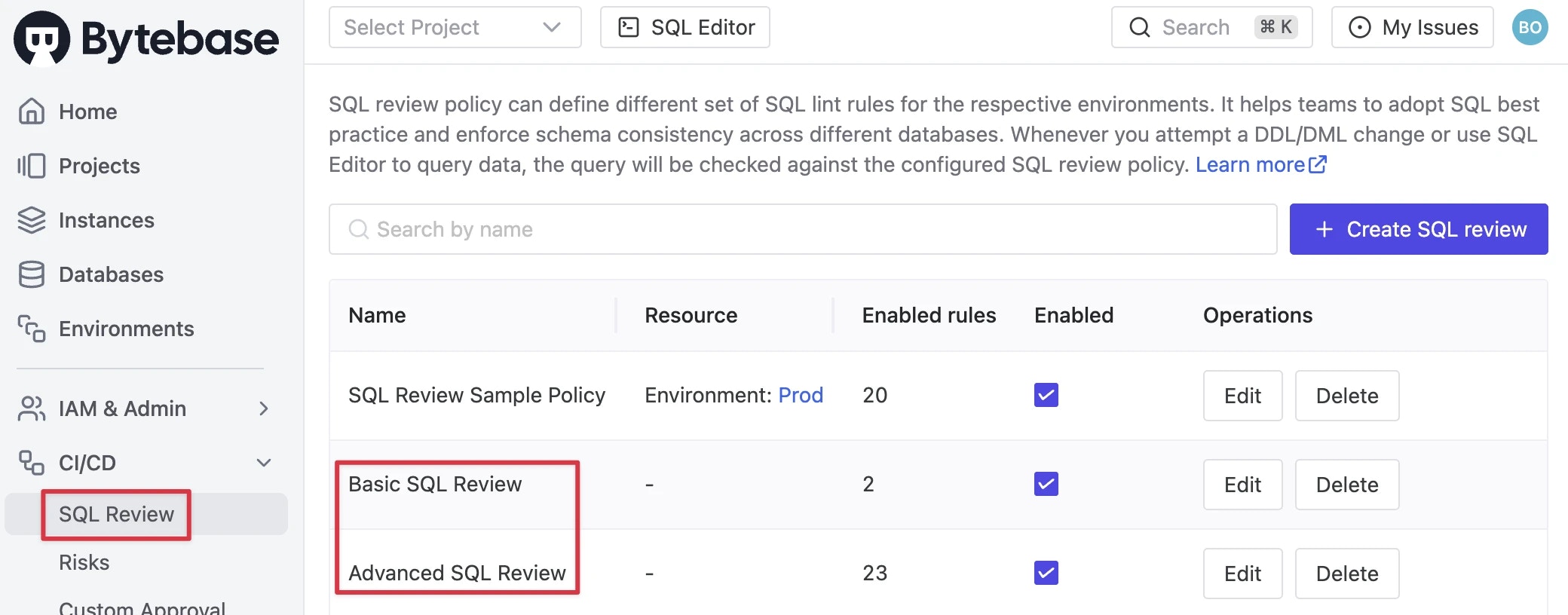
2. In the Bytebase console, navigate to **CI/CD > SQL Review** to see the applied SQL review rules. You may click **Edit** to change the rules.
## Obtain the Access Token
1. Go to [Bytebase API Example repo](https://github.com/bytebase/example-api) and clone it.
2. Navigate to the `sql-review` subfolder and follow the instructions in the `README.md` file of the example code repository to execute the scripts.
3. Replace `bytebase_url`, `bytebase_account`, and `bytebase_password` in the commands below with your own values, then run them to obtain a `bytebase_token` in your terminal.
```bash theme={null}
export bytebase_url=http://localhost:8080
export bytebase_account=api-sample@service.bytebase.com
export bytebase_password=bbs_************ilcLVG
bytebase_token=$(curl -s ${bytebase_url}/v1/auth/login \
--data-raw '{"email":"'${bytebase_account}'","password":"'${bytebase_password}'"}' \
--compressed | grep -o '"token":"[^"]*"' | sed 's/"token":"//; s/"$//')
echo $bytebase_token
```
## Configure SQL Review Policies
1. Continue following the `README.md` to run the scripts.
```bash theme={null}
curl --request PATCH "${bytebase_url}/v1/reviewConfigs/basic?allow_missing=true&update_mask=rules" \
--header 'Authorization: Bearer '${bytebase_token} \
--data @policy/basic.json
curl --request PATCH "${bytebase_url}/v1/reviewConfigs/advanced?allow_missing=true&update_mask=rules" \
--header 'Authorization: Bearer '${bytebase_token} \
--data @policy/advanced.json
```
2. In the Bytebase console, navigate to **CI/CD > SQL Review** to see the applied SQL review rules. You may click **Edit** to change the rules.
 ## Attach SQL Review Policies to Resources
We'll apply these SQL review rules to `environments` or `projects`. Project-level rules take precedence over environment-level rules.
1. Run these command in 'README.md' of the repo to apply the SQL review rules to environments.
```bash theme={null}
curl --request PATCH "${bytebase_url}/v1/environments/test/policies/tag?allow_missing=true&update_mask=payload" \
--header 'Authorization: Bearer '${bytebase_token} \
--data @binding/environments/test.json
curl --request PATCH "${bytebase_url}/v1/environments/prod/policies/tag?allow_missing=true&update_mask=payload" \
--header 'Authorization: Bearer '${bytebase_token} \
--data @binding/environments/prod.json
```
2. Continue with the `README.md` to apply the SQL review rules to projects.
```bash theme={null}
curl --request PATCH "${bytebase_url}/v1/projects/project-sample/policies/tag?allow_missing=true&update_mask=payload" \
--header 'Authorization: Bearer '${bytebase_token} \
--data @binding/projects/project-sample.json
```
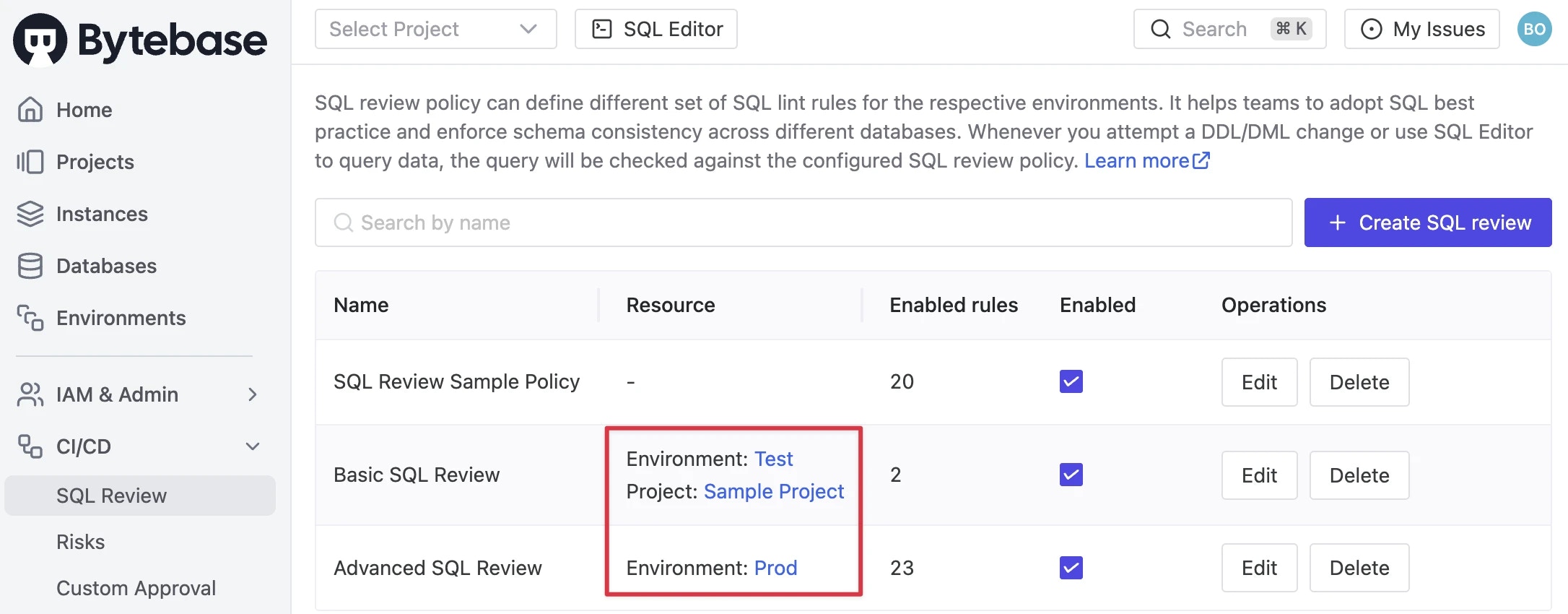
3. On the **CI/CD > SQL Review** page, you will see the SQL review rules are applied to environments and projects.
## Attach SQL Review Policies to Resources
We'll apply these SQL review rules to `environments` or `projects`. Project-level rules take precedence over environment-level rules.
1. Run these command in 'README.md' of the repo to apply the SQL review rules to environments.
```bash theme={null}
curl --request PATCH "${bytebase_url}/v1/environments/test/policies/tag?allow_missing=true&update_mask=payload" \
--header 'Authorization: Bearer '${bytebase_token} \
--data @binding/environments/test.json
curl --request PATCH "${bytebase_url}/v1/environments/prod/policies/tag?allow_missing=true&update_mask=payload" \
--header 'Authorization: Bearer '${bytebase_token} \
--data @binding/environments/prod.json
```
2. Continue with the `README.md` to apply the SQL review rules to projects.
```bash theme={null}
curl --request PATCH "${bytebase_url}/v1/projects/project-sample/policies/tag?allow_missing=true&update_mask=payload" \
--header 'Authorization: Bearer '${bytebase_token} \
--data @binding/projects/project-sample.json
```
3. On the **CI/CD > SQL Review** page, you will see the SQL review rules are applied to environments and projects.
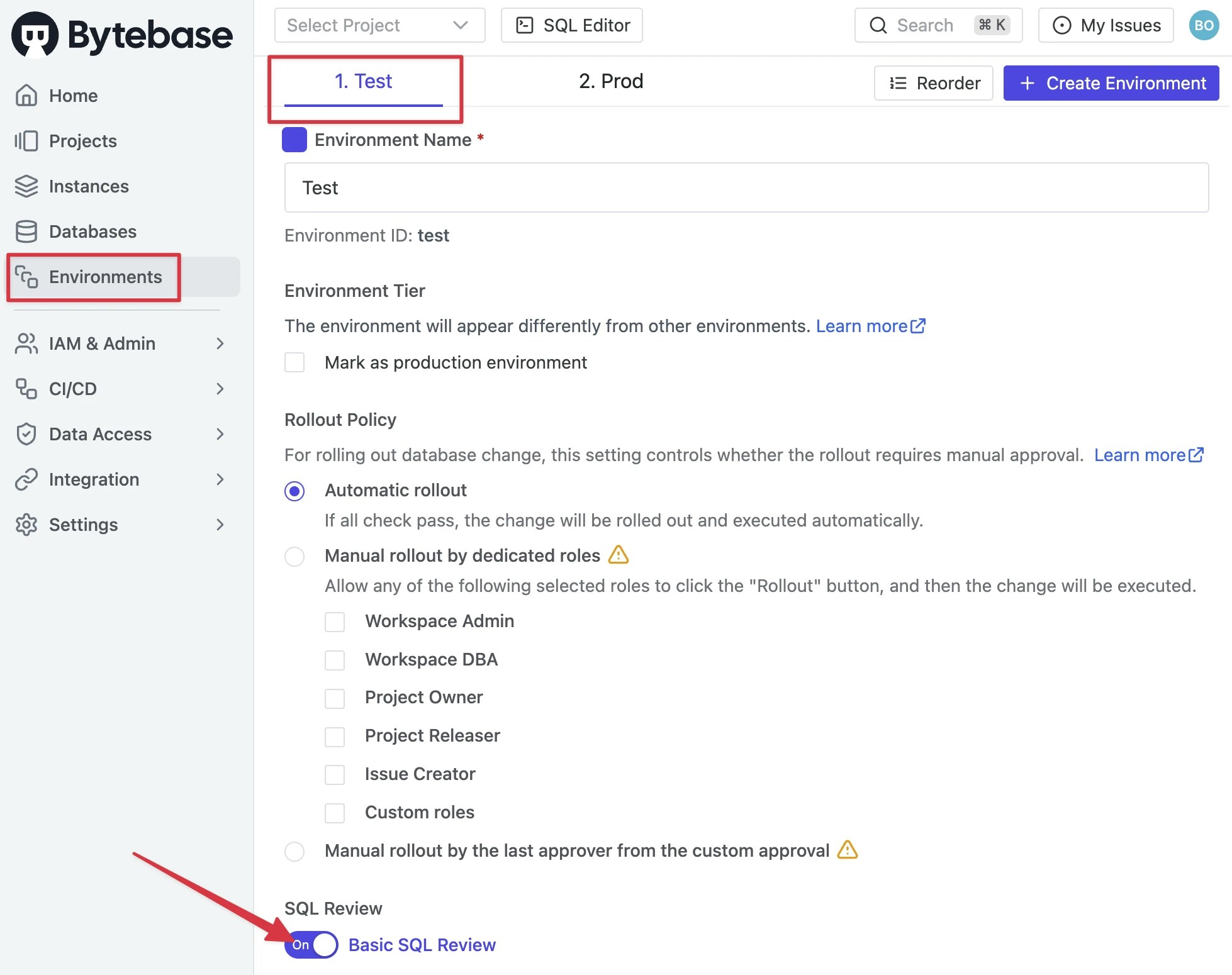
 4. Go to **Environments** page, click **Test** environment to see the applied SQL review rules.
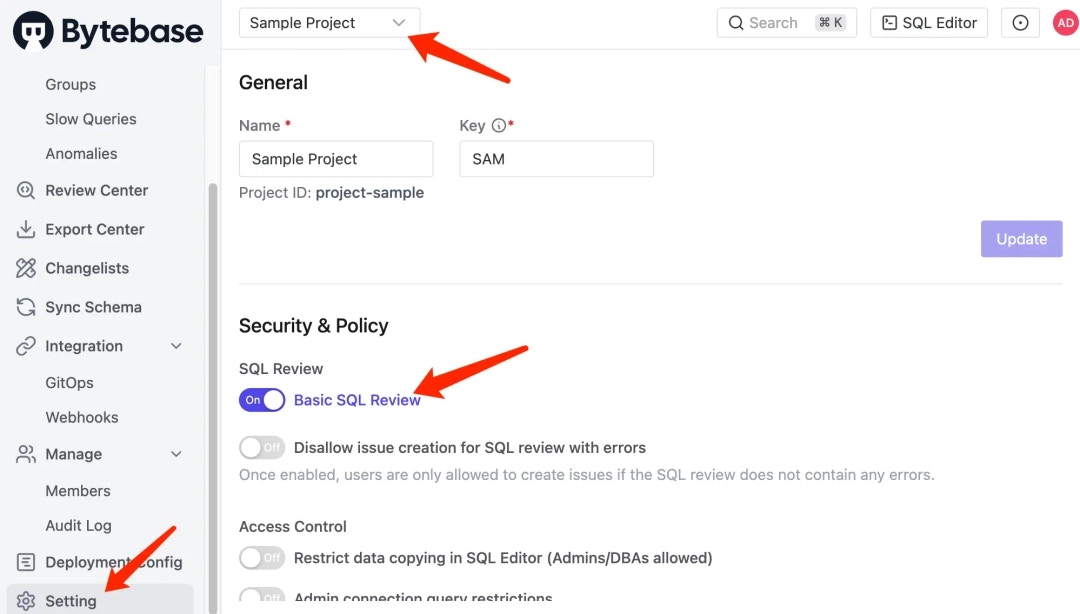
 5. Go to `Sample Project` page, click **Setting** on the left sidebar to see the applied the SQL review rules.
 6. To detach SQL review policies from environments, use the following commands:
```bash theme={null}
curl --request DELETE ${bytebase_url}/v1/environments/test/policies/tag \
--header 'Authorization: Bearer '${bytebase_token}
curl --request DELETE ${bytebase_url}/v1/environments/prod/policies/tag \
--header 'Authorization: Bearer '${bytebase_token}
```
Similarly as to detach from projects:
```bash theme={null}
curl --request DELETE ${bytebase_url}/v1/projects/project-sample/policies/tag \
--header 'Authorization: Bearer '${bytebase_token}
```
7. To delete the SQL review rules, use the following commands:
```bash theme={null}
curl --request DELETE ${bytebase_url}/v1/reviewConfigs/basic \
--header 'Authorization: Bearer '${bytebase_token}
curl --request DELETE ${bytebase_url}/v1/reviewConfigs/advanced \
--header 'Authorization: Bearer '${bytebase_token}
```
## Summary
Congratulations! You can now codify SQL review rules using the Bytebase API, in addition to the Bytebase GUI, making SQL review policy as code a reality.
6. To detach SQL review policies from environments, use the following commands:
```bash theme={null}
curl --request DELETE ${bytebase_url}/v1/environments/test/policies/tag \
--header 'Authorization: Bearer '${bytebase_token}
curl --request DELETE ${bytebase_url}/v1/environments/prod/policies/tag \
--header 'Authorization: Bearer '${bytebase_token}
```
Similarly as to detach from projects:
```bash theme={null}
curl --request DELETE ${bytebase_url}/v1/projects/project-sample/policies/tag \
--header 'Authorization: Bearer '${bytebase_token}
```
7. To delete the SQL review rules, use the following commands:
```bash theme={null}
curl --request DELETE ${bytebase_url}/v1/reviewConfigs/basic \
--header 'Authorization: Bearer '${bytebase_token}
curl --request DELETE ${bytebase_url}/v1/reviewConfigs/advanced \
--header 'Authorization: Bearer '${bytebase_token}
```
## Summary
Congratulations! You can now codify SQL review rules using the Bytebase API, in addition to the Bytebase GUI, making SQL review policy as code a reality.