Blender 5.0: User Interface
General
- Shape Keys: Allow drag and drop within shape keys list. (0eed084cad)
- Add "Remove All Particle Systems" operator. (e859df1126)
- Move empty image option to Image category in Add menu (moved from "Empty" menu). (0324ca7f15)
- Add icons to the list of Visible Tabs in Properties Editor. (edd1bad406)
- "Region Toggle Pie" option is no longer hidden behind "Developer Extras" option. (5be3b6acdb)
- 3D Viewport: Rename "HDRI Preview" overlay to "Reference Spheres". (8404228aeb)
- Remove Material Slots button is disabled in edit mode. It would just fail before. (bdbc2a9fd9)
- All Animation editors and Sequencer now feature a footer region with playback and frame range controls. (35bcbad7e9)
- Toolbar in image mask editor (4bede1b555)
- New "Delete Other Workspaces" context menu entry for workspace tabs (7f8d01f809)
- Improve image output File Format menu. (86000f78ba)
- Snapping added for sidebars. (7c110f265e)
- Improved Display as Panels Narrow. (ca3076ed35)
- Increased Area Padding at Window Edges. (24a80f250e)
- Auto language setting now works correctly for Chinese variations. (7c013f9ea8)
- Area maintenance operator transitions. (c793bfda23)
- Camera background images use "Fit" by default. (68c4f55af7)
- Antialiased custom mouse cursors for Wayland. (ac457b9836)
- "Time" mouse cursor improved for Windows and Linux. (bea1dbfab0)
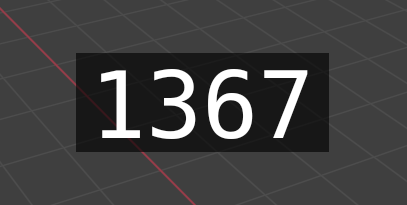
Time Cursor - Improved "Move to Collection" with search. (3f9d9c9e6b)
- Gray out asset shelf toggle when no asset shelf is available. (3c3c01a67c)
- Center-align header text in modal operators. (02879c2d85)
- Switching workspaces no longer forcibly changes an object's mode if the object is invisible. (8b1f2dfc45)
- Properties Editor: Add Scene/ViewLayer selectors to Properties tabs. (4560e60670)
- Shortcuts can now be created for "External Operation" items. (fcc434d60e)
- Text characters not found show custom "not defined" image rather than use "Last Resort" font. (972c0b9463)
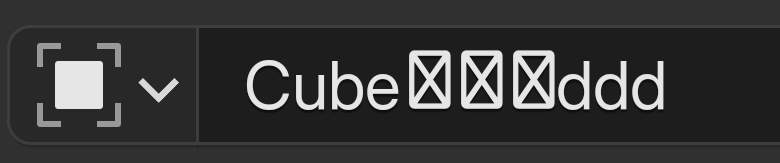
Character Not Found - Some area maintenance routines now use fade effects for clarity and polish. (e154175a90, 494c32735f)
- "Full Screen Area" now called "Focus Mode". (8ba44fe799)
- Improved alignment of Playhead and keyframes. (6ac9b974ea)
- Top Bar overlap of layout tabs now shows fade effect. (74b6e675d4)
- Simplification of the Shape Key Specials menu. (af44aada51)
- Some regions now indicate overflow with a line or gradient. (91ebf29877)
- Blender will no longer pause while periodically validating invalid file system items. (42b6c7f804)
- Generalized Alert and Popup Error indication. (9a3f80b8f2, 6485722c17)
- Warning when starting with non-blend file argument. (35d84e3336)
- Dyntopo Confirmation Improvements. (048447dcc2)
- Corner Area zone can be made visible, shows popup maintenance items. (83e59eea9c)
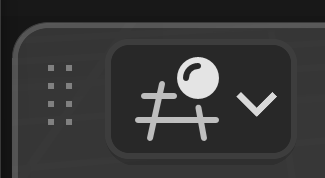
Area Maintenance Gripper - Temporary windows now save and restore size and position. (91997ea89f)
- File browser font tooltips improved with larger preview. (68e5851615)
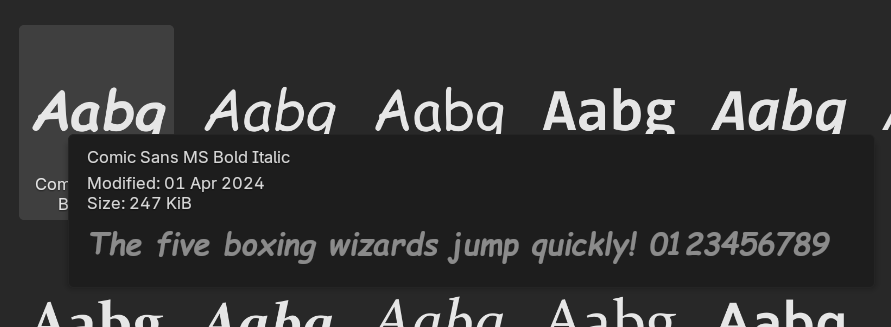
Font Preview - Changes to the appearance of the animation playhead. (a9588e46e1)
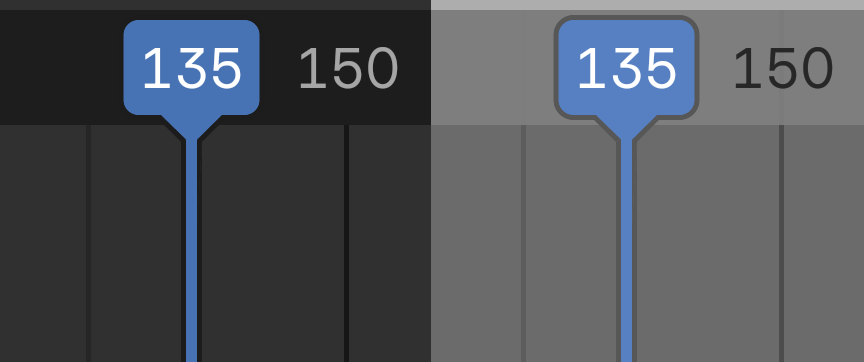
Playhead - Option to always show the arrows for numerical inputs. (f7cdd3e867)
- Add ability to collapse paint pressure curves. (5b02341a11)
- Splash now has one more row for templates/recent files, and templates have icons. (06b13c8fb4)
- The number of stored recent files is increased and one can search for them more easily.
(fa03d2558c)
- Composition guide overlay color is now per-camera. (3e51b449be)
- Grey out 'Show Object Origins' option in paint modes. (15ddff12d4)
- Color the axes in the 3D/2D cursor overlay. (b9e1e2a8ee, 043d9e77b0)
- Labels for non-editable linked items are now greyed out. (8de2e6f9fb)
- Movie Clip Editor now has overlays. (18d0532915)
- Multiple shapekeys can be selected and dragged in the list. (f1d0f79302)
- Statistics overlay now shows point cloud points. (ed6caa5e80)
- Bundled MatCaps have been updated, expanded, and improved. (cc04e0128d)
- Menus and popups stay open until a click closes, with preference for old behavior. (5953ff318c)
- The Make Local button of material selectors (showing a linked or packed icon) is now disabled if the material is assigned to non-editable object data (like a linked or packed mesh data-block). (4ff75e054b)
Theme
Theme settings have changed significantly in Blender 5.0 to make creating custom themes easier. Numerous theme settings have been unified, and in total 300+ settings were removed. Because of that, custom themes from 4.5 LTS are expected to break in the new version. Users (and especially theme extension maintainers) are advised to read the migration notes to learn about upgrading their themes.
- New theme settings:
- Outline Selected for all widgets. Makes it possible to define a specific outline color for active elements, instead of using the same color for all states. (23fb5752ed)
- Panel Outline, in the new panel section under User Interface. (db9ae93f02)
- New settings to adjust Curve widgets (such as RGB Curves, Hue Correct, or Bevel custom profile curves). (b74e696acc)
- New setting to adjust W axis color, used by quaternion and axis-angle F-Curves. (0fa67c3ea2)
- Theme settings for editor region have been unified in the new Regions panel:
- Asset Shelf now follows a global style, instead of being per-editor. (11e729219a, fe0fe0a5ed)
- Theme Source List was removed from animation editors, region colors are now unified in Regions -> Channels (fe0fe0a5ed)
- Toolbar/Sidebar region styling settings were removed from all editors, region colors are now unified in Regions -> Toolbar / Sidebars. (fe0fe0a5ed)
- Colors for scrubbing/markers regions were moved from each animation editor to a unified section under Regions -> Scrubbing / Markers. A new property has been added for the Timestamp color, which was previously controlled by the editors text color. (250384dd57)
- Theme settings for shared concepts have been unified in the new Common panel:
- Current Frame color, which was unique to each animation editor (and 3D viewport) was moved into Common -> Animation and renamed to Playhead. (a459556ebd)
- Preview Range & Keyframe colors were removed from individual editors, now they're unified in Common -> Animation. (39c066ee53, cb22938fe9)
- Settings for channels, tracks, and channel groups were removed from individual editors, now they're unified in Common -> Animation. New unified Channel and Selected Channel colors also work on Movie Clip Editor (Dope Sheet mode) channels, which were previously hard-coded and not themeable. (a459556ebd, 7f62d5d85e)
- Settings for Bézier curve handles were removed from 3D Viewport, Graph Editor, Image/UV Editor, and Movie Clip Editor. They're now unified in Common -> Curves. (7d2b024151)
- Unified "User Interface" settings:
- Sidebar tabs now follow the global styling of the tab widget. (e8735c3203)
- Panels now follow a global style, instead of being per-editor. (7818082d02)
- Move region text and title colors to Panel, and remove unused text highlight. (695a03d9f4)
- Paint Curve color settings were removed from 3D Viewport and Image Editor, they use gizmo colors instead. (eca7056cfe)
- Removed settings:
- Remove unused List styling from Nodes/Spreadsheet. (19c15e0218)
- Remove "Navigation Bar" and "Execution Region" theme settings. (dd43eae0d3)
- 19 unused settings were removed from various editors. (15567f597d)
- "Face Dot Selected" color was removed from 3D Viewport and Image/UV Editor. Regular Face Selected color is used instead. (e0392599f8)
- "Active Spline" color was removed from 3D Viewport. (1067112c11)
- Other:
- Node Editor: Make node headers use the exact theme color, instead of a hardcoded mix. (2ea3cd2188)
- Changes to geometry attribute colors in 3D Viewport: "Edge Bevel" and "Vertex Bevel" were combined into one Bevel property. "Freestyle Edge Mark" and "Freestyle Face Mark" were also combined into one Freestyle. The word "Edge" was removed from the remaining attributes - Crease, Sharp, and Seam. (28b97afda2)
Templates
- New template and workspace: Storyboarding. (039549900b)
- "Video Editing" added playback footer. The default scene is now called "Edit". (4bc240696e)
- "2D Animation" added playback footer. Compositing and Rendering workspaces removed, since they were identical to the "General" ones. (33ca6456d0)
Tree View
- Multi-selection support (used by Shape Keys list): (a559fb833c)
- Delete with X key (e297fb4f14)
- Rename items with F2 key. (58d078fa3d)
- Auto focus active tree element (ad04c9dfdf)
- All selected shape keys can be Drag-drop at once (f1d0f79302)
- Many tree-views allow searching by name now (db570bfe09)
Text & Labels
- Improve and unify background running jobs labels. (f6771d8e21)
- Replace contractions with long-form text. (5998795aa6)
- More descriptive descriptions/tooltips for editors. (41a1e871ef)
- Better error message when entering modes on linked/packed data. (38d5838b2b)
Preferences
- New "Developer Tools" tab to group debugging tools. (4c2ea47aec)
- "Experimental" tab is now always visible (during alpha), regardless of "Developers Extras". (4c2ea47aec)
- Preferences can now be optionally opened in maximized area in main window. (da781fd685)
- Preferences window is now wider by default. (4c2169267a)
Node Editor
Drawing
- Nodes look more flat with less of a drop-shadow.

New Node Theme (right is new) - Group nodes are now draw a stack of nodes as indicator while getting rid of the icon in the node
header. This makes them look more like built-in nodes. (916f0afd45)
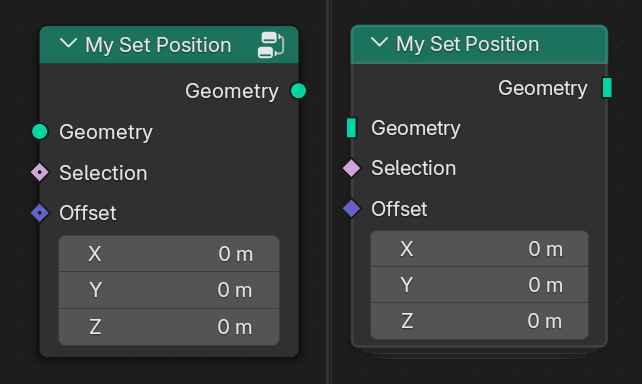
Group Node Indicator (right is new) - While group nodes can still be entered with the tab key, it's now possible to enter them with double click too.
- There are two new ways to leave a node group. One can either double click in empty space in the
node editor or click on the breadcrumbs at the top of the editor. (7a01f736a5)
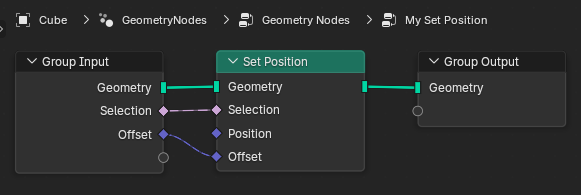
Node Editor Breadcrumbs are now clickable - The breadcrumbs also indicate whether a node group is linked or packed now. (e6a3328da7)
- Collapsed nodes are drawn more rectangular instead of pill-shaped now. (23ad91ce53)
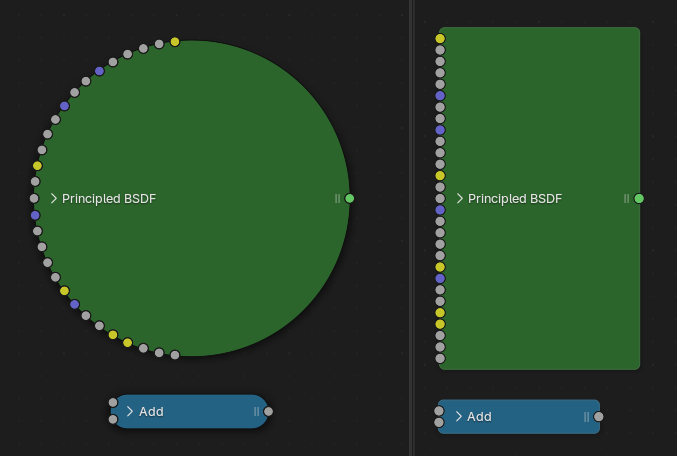
Collapsed Node Drawing - The semantics of socket shapes has been changed. See the blog for more details (e72e049c84)
- The label of node groups can be optional now, resulting in a cleaner UI in some cases (ef92735a95).
- Node tooltips show the
idnameof a node when Python tooltips are enabled. This is especially useful for add-on developers. (c1f4b6e9d8)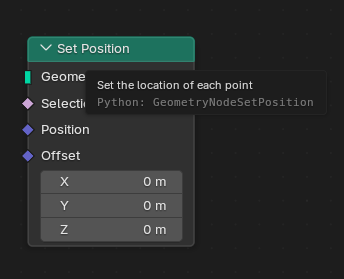
Node Idname in tooltip - The tooltip drawing for sockets has been completely revamped. It more clearly separates the
static information of a socket like the name and description from dynamic information like the
last evaluated value. (f2ee95843c)
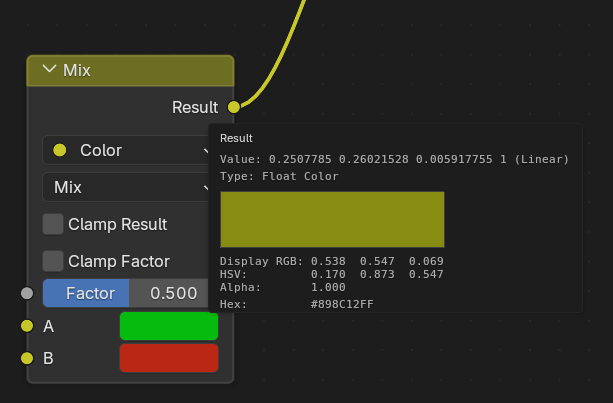
Color tooltips now show the actual color if possible
Operators
- The new "Swap Node" operator replaces a node with a different node type. It is mapped to
Shift + S by default (2a1a658492).
- Multiple Group Input nodes can be joined with ctrl+J
(f025637e3b).
- Tools have been added to the toolbar for the "Mute Links" and "Add Reroute" operators.
(c954d6cdfd)
- Node search node supports searching for strings, data-blocks and group inputs
(986219bf37,
1ffa0c4648).
- When selecting a group input/output, the corresponding group interface properties are shown in
the sidebar. This avoids having to switch between the Node and Group tab.
(93e91f2116)
- Mesh Shear Status Bar Display Improvements. (a08aabc9ee)
- Vertex Slide status bar display improved. (0bcab8913f)
- Status Bar Improvements for Sculpt Expand Operator. (923b5f88ba)
Dynamic Output Visibility
The visibility of group outputs can depend on group inputs now. There is a new Enable Output node to control this behavior. Note that visibility is only affected if this node is controlled with a menu input, not just with a boolean input. (b186e60759, e3e7bd670a)
Switch
- Index Switch and Menu Switch nodes have a new plus button that allows adding more inputs without the sidebar (25c84e90df).
- The index switch node can show labels of a linked menu switch node now
(1fd6d9263c).
- The Menu Switch node has a boolean output for each item determining whether that item is chosen (bfc5f8d51c).
Miscellaneous
- New node positions are clamped to region bounds. (e15537c049)
- Use icons for sockets in data-type menus. (8d6c717e34)
- Socket labels on linked node trees are grayed out now. (16a9bb1be7)
- Unified Color node names throughout editors (Compositing/Geometry/Shader). (fff3af04c4)
- Improved File Output UI. (f955eae545)
- Add icons to node-tree sub-types. (4d016a7b4f)
- If only one reroute is added on existing links, it will become active (e869ae360c).
- Add menus were reordered for better consistency among node editors (5e0b244066)
Outliner
- Keep Transform by default on drag-dropping to parent. (1d37f76b91)
- Improvements to row highlights. (c046b8bb21)
- Added number shortcuts for collection visibility. (59a971294c)
- Empty ID types no longer shown in Blender File View. (8e992a15e8)
Spreadsheet
- The spreadsheet shows stats of individual volume grids now.
(9d20c8d3c8)
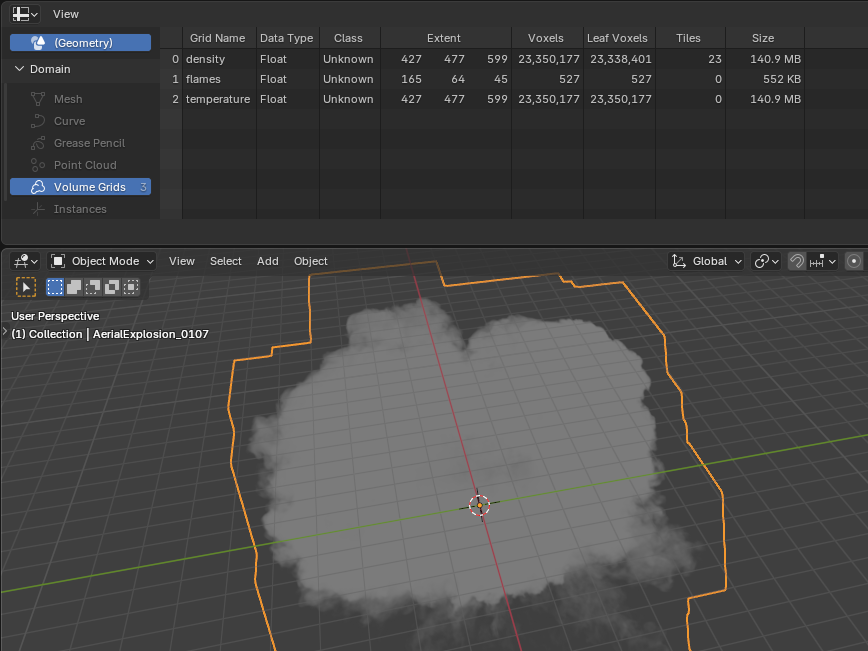
Volume Grid Stats
Widgets
-
Draw top bar tabs as pills. (864afd76a7)

Top Bar Pills
- Draw sidebar tabs/categories as pills in regions that support overlap. (71e02b3229)
Icons
- Added icons for Vertex and Edge crease, Edge Bevel Weight, Mark Seam, and Mark Sharp. (840310f607, 0155ad92a4)
- New icon for Sequencer strip modifiers. (526f46d2c3)
- All icons featuring a looking-glass have been flipped, to be consistent with modern OS and other software. (84af3e8b47)
- Color icons used for colored collections. This helps with light themes. (b11093306b)
-
Locked and Unlocked icons are now horizontally symetrical. (c03fdf5d9d)

Lock Icons
Keymap
- The number shortcuts for collection visibility (1, 2, 3, etc.) have been moved from the 3D Viewport to the Outliner. (59a971294c)
- Jump to Previous keyframe using Up Arrow, Next keyframe using down arrow. (abf743c380)
Accessibility
- Add "Reduce Motion" option to avoid non-essential animation effects. (eae4585177)
Platforms
Linux
- Paths in the title bar now use the common abbreviation
~/for the home directory. (21e9be6c5e) - Support for the cursor-shape protocol (under Wayland). This means compositors that support the cursor-shape protocol will show cursors with the correct size & theme, otherwise Blender's built-in cursors are used. (232b106e64)